
Babysense Max View Pro Baby Monitor Review
A clear, secure, and feature-packed non-WiFi baby monitor with two cameras and an excellent split-screen display.
 By: Tali Ditye, Ph.D., Co-founder
Mommyhood101 independently curates baby gear to help inform decisions; if you buy through links on our site, we may earn a commission.
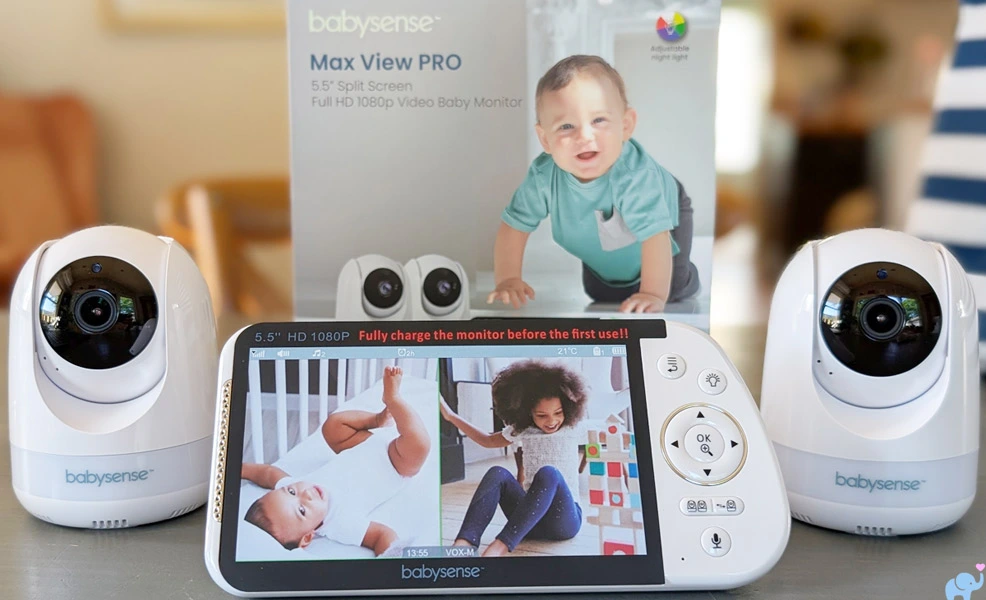
The Babysense Max View Pro, also marketed as the Babysense Pro, is a dedicated non-WiFi baby monitor designed for parents who want a traditional handheld display rather than a phone app.
Could it deserve a spot on our list of best baby monitors? Let's test it out!
-
- Take-Home Message
- Unboxing
- Features
- Specifications & Design
- Cameras & Movement
- Mounting Options
- Camera Night Lights
- Parent Unit & Controls
- Daytime Video Quality
- Night Vision & Zoom
- Split Screen & Multiple Cameras
- Reception & Range
- Audio, Intercom, & Sound Meter
- VOX Mode & Standby
- Temperature Monitoring
- Battery & Charging
- Privacy, Security, & Recall Information
- Max View Pro vs. Infant Optics DXR-8 Pro
- User & Reddit Sentiment
- Things we Loved
- Things we Disliked
- Conclusions
- References Cited
Our Babysense Max View Pro Review
Nobody wants to read this entire article just to get to the point. You've got more important things to do!
Here are our findings right up front.
The Babysense Max View Pro is an excellent non-WiFi baby monitor for families who want two cameras, a large dedicated display, and the ability to watch two rooms or children simultaneously.
Its strongest features are the bright and high-resolution 5.5-inch parent display, clear daytime video, useful infrared night vision, genuine split-screen monitoring, excellent camera movement, versatile mounting hardware, colorful night lights, accurate temperature sensor, and strong reception throughout a multi-level home.
Here is a summary of what we loved, and a few things that could be improved.
✔️ Supports up to four cameras.
✔️ Secure non-WiFi connection.
✔️ No app or account required.
✔️ No subscription fees.
✔️ Large 5.5-inch parent display.
✔️ Bright, quality screen.
✔️ Full-HD 1920 x 1080.
✔️ Excellent split-screen mode.
✔️ Automatic camera-scan mode.
✔️ Remote camera pan and tilt.
✔️ About 340-degree rotation.
✔️ About 130 degrees tilt.
✔️ 2x and 4x digital zoom.
✔️ Clear daytime video.
✔️ Useful infrared night vision.
✔️ Six night-light colors.
✔️ Three night-light brightness.
✔️ Rainbow night-light mode.
✔️ Five lullabies and white noise.
✔️ Two-way intercom.
✔️ Visual sound-level indicator.
✔️ Accurate temperature.
✔️ Fahrenheit and Celsius display.
✔️ High and low temp alerts.
✔️ Strong reception across floors.
✔️ Good outdoor range.
✔️ Long 8-foot power cords.
✔️ USB-C power connections.
✔️ Standard base mounting hole.
✔️ Universal 1/4"-20 tripod mount.
✔️ Convenient display kickstand.
✔️ Dedicated physical controls.
✔️ Large 5000mAh battery.
❌ 1 camera audio at a time.
❌ No zoom in split-screen mode.
❌ Audio active in screen-off mode.
❌ White noise prevents VOX standby.
❌ No phone app or remote viewing.
❌ No recording or video history.
The Max View Pro's defining feature is its excellent split-screen mode, which displays both cameras simultaneously on the bright 5.5-inch screen. This makes it especially useful for twins, siblings in separate rooms, or monitoring a nursery and playroom.
The cameras also provide excellent movement, with approximately 340 degrees of horizontal rotation, 40 degrees of downward tilt, and 90 degrees of upward tilt. Reception was strong across three levels of our home and reached about 70 feet outdoors with the camera in the basement and 150 feet with it on the first floor.
The main limitations are that only one camera provides audio or intercom at a time, and zoom is unavailable in split-screen mode. VOX also appeared to respond only to the currently selected camera during our testing, so parents monitoring two rooms should test this feature carefully before relying on it overnight.
Overall, we give the Babysense Max View Pro a very good 4.3 out of 5. Its clear video, strong range, versatile cameras, useful night lights, and excellent split-screen display make it one of the better dedicated two-camera monitors we have tested.

Feel like an expert on the Babysense Max View Pro already? You should!
But if you are still uncertain, continue reading to see exactly how we reached these conclusions.
Unboxing
To be completely transparent, Babysense provided us with a Max View Pro baby monitor for hands-on testing.
The baby monitor arrives in a nicely designed retail box rather than a plain brown shipping carton.
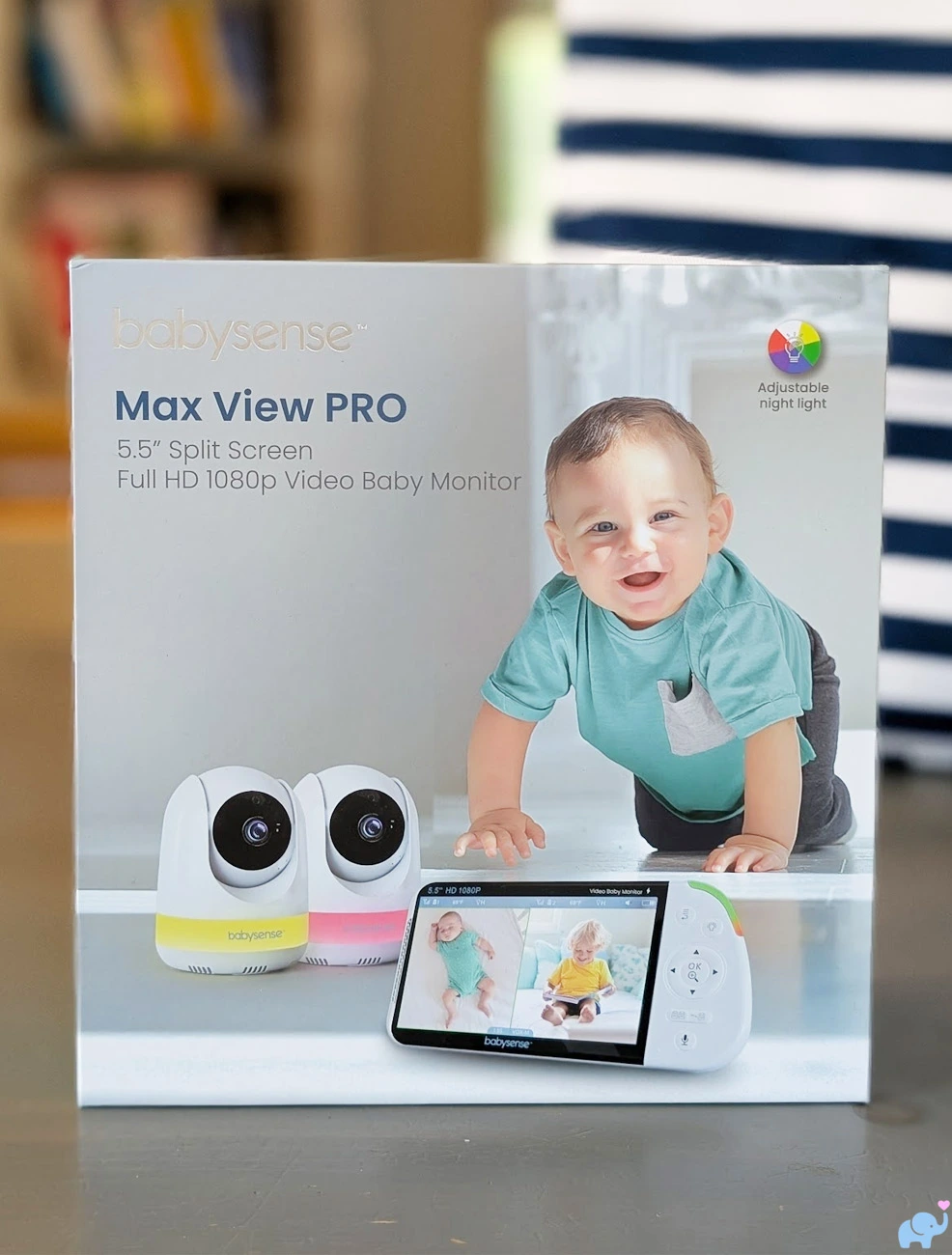
The packaging is colorful, clearly branded, and polished enough to make it a reasonable baby-shower or registry gift.
That is a noticeable improvement over the basic brown-box presentation we encountered when reviewing the Delta Children Smart Sleep baby monitor.
Opening the larger retail box reveals that the major components are protected inside their own smaller boxes.
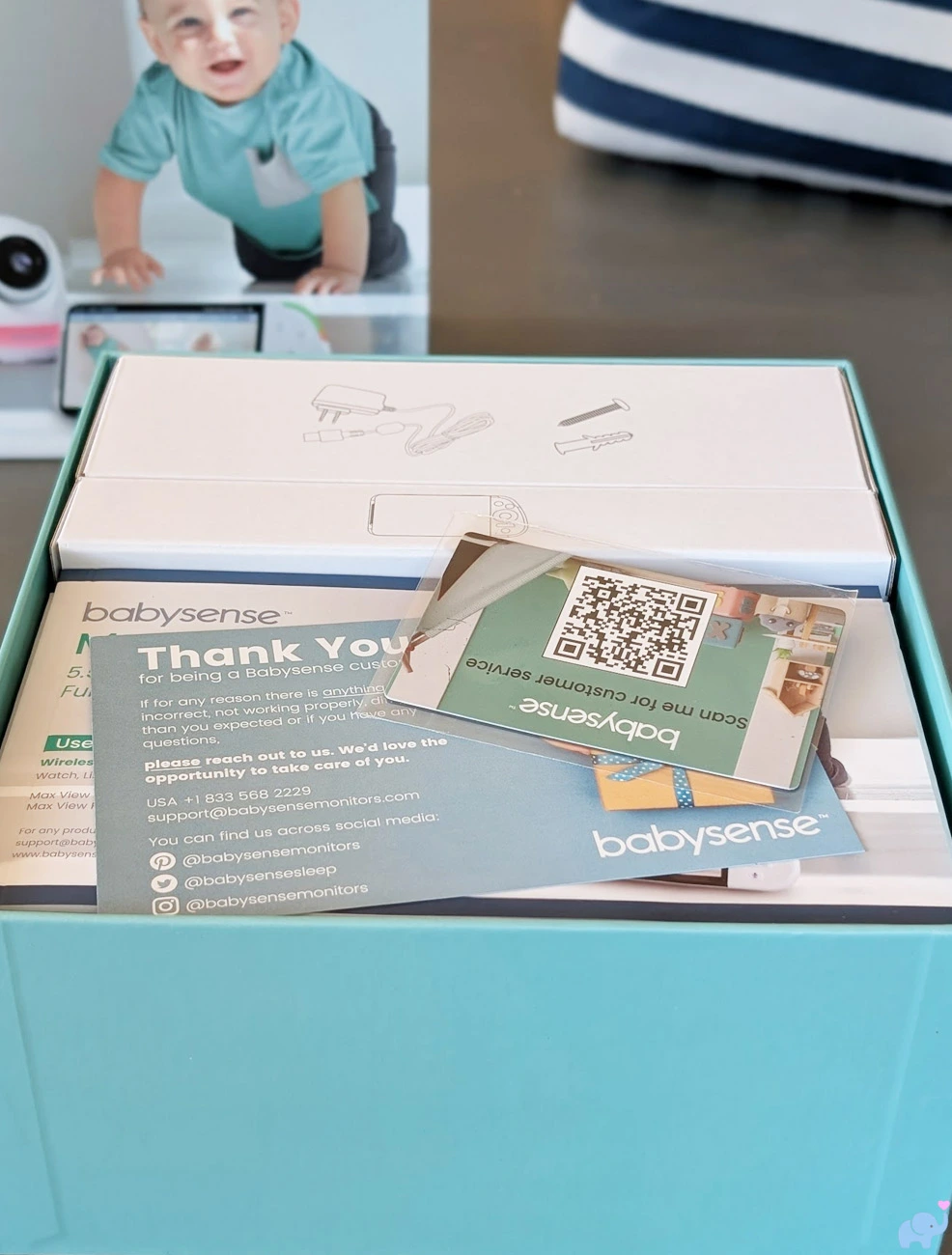
This compartmentalized packaging kept the parent unit, cameras, cables, and accessories separated and secure.
Everything arrived without scratches, loose parts, or visible shipping damage.
Once unpacked, the two-camera package includes:
- The 5.5" parent unit.
- Two motorized camera units.
- Three power adapters and cords.
- Two camera wall-mounting screw sets.
- Wall anchors.
- User manual.
- Customer-service and support cards.
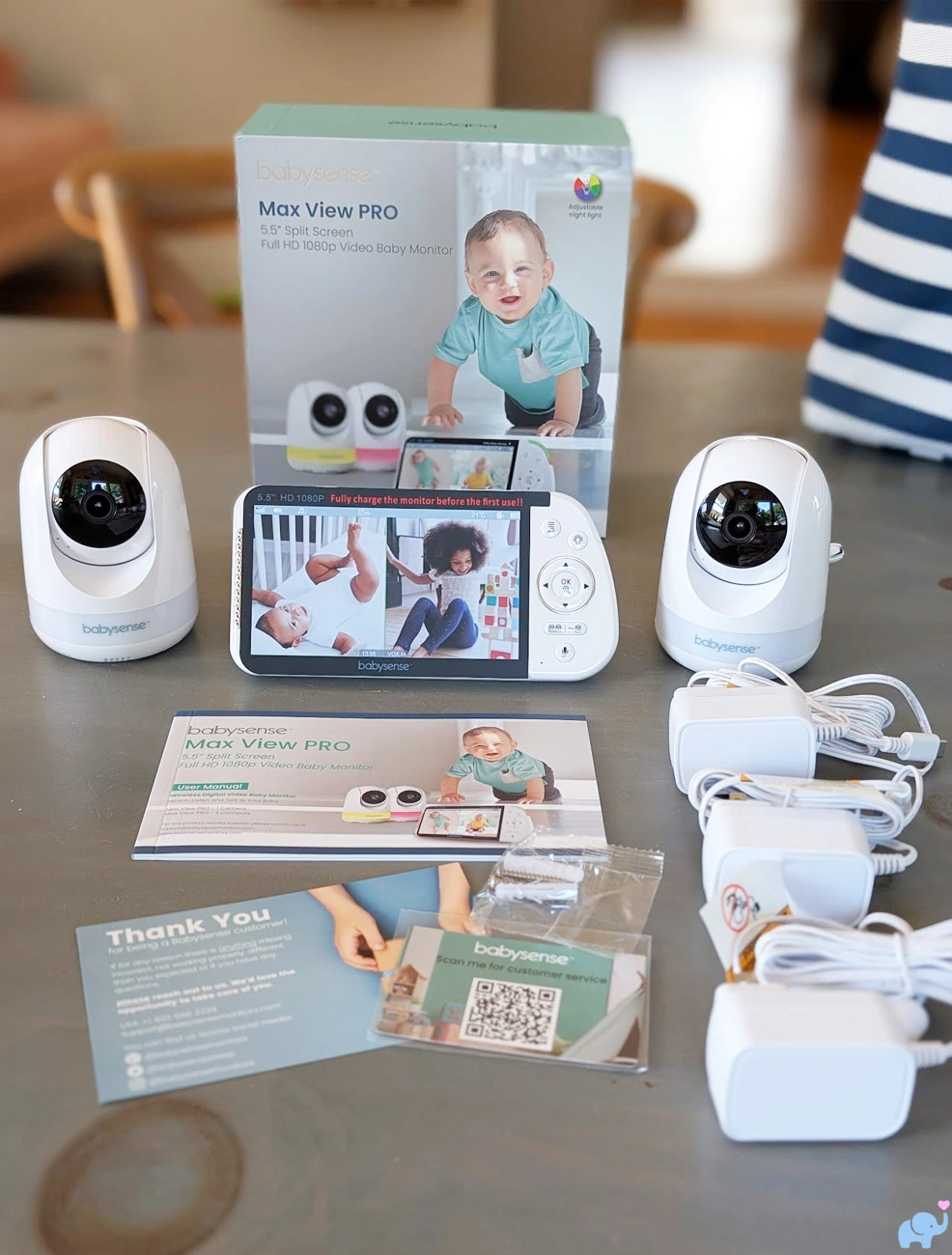
The three power cords are each approximately eight feet long.
That generous length makes it considerably easier to place the cameras high on a wall, on a shelf, or near a crib while keeping the power connection safely outside the child's reach.
Two cords power the cameras, while the third charges and powers the handheld parent unit.
The cameras are paired with the display at the factory, so basic setup is nearly plug and play.
We connected each camera to power, turned on the parent unit, and both video feeds appeared without needing an app, account, WiFi password, QR code, or manual pairing process.
Features
The Max View Pro includes an extensive collection of features for a dedicated non-WiFi baby monitor.
Its primary features include:
- Two-camera monitoring system.
- One- and three-camera bundles also available.
- Support for up to four paired cameras.
- Secure direct 2.4GHz FHSS connection.
- No home WiFi required.
- No mobile app.
- No online account.
- No subscription fees.
- 5.5-inch TFT parent display.
- 1920 x 1080 parent-screen resolution.
- Simultaneous two-camera split-screen viewing.
- Automatic camera-scan mode.
- Remote horizontal pan.
- Remote vertical tilt.
- 2x and 4x digital zoom.
- Color daytime video.
- Automatic infrared night vision.
- Six-color camera night light.
- Three night-light brightness levels.
- Rainbow color-changing mode.
- Three rainbow transition speeds.
- Five built-in lullabies.
- Built-in white noise.
- Two-way talk.
- Adjustable parent-unit volume.
- Visual sound-level indicator.
- VOX sound-activated standby.
- Low, medium, and high VOX sensitivity.
- Temperature display.
- Fahrenheit and Celsius modes.
- Adjustable high and low temperature alerts.
- Clock.
- Timer.
- Adjustable warning-alert volume.
- 5000mAh parent-unit battery.
- Built-in parent-unit kickstand.
- Folding parent-unit antenna.
- USB-C power connections.
- Standard wall-mounting hardware.
- Universal 1/4"-20 camera mounting socket.
That is a strong feature set for families who want a dedicated monitor without the complexity or privacy concerns associated with a WiFi camera.
The monitor does not provide smartphone access, video recording, cloud storage, motion history, sleep analytics, breathing tracking, or remote viewing while away from home.
Instead, it focuses on reliable live video and audio within and immediately around the home.
Specifications & Design
| Specification | Babysense Max View Pro |
|---|---|
| Product type | Dedicated non-WiFi video baby monitor |
| Tested bundle | Parent unit with two cameras |
| Other bundles | One- and three-camera versions |
| Maximum paired cameras | Four |
| Parent-unit model | VBMN55RX |
| Connection | Direct 2.4GHz FHSS radio connection |
| WiFi or app required | No |
| Parent display | 5.5-inch TFT LCD |
| Display resolution | 1920 x 1080 pixels |
| Split screen | Two simultaneous live camera feeds |
| Horizontal camera movement | Approximately 340 degrees in our testing |
| Vertical camera movement | Approximately 40 degrees down and 90 degrees up |
| Zoom | 2x and 4x digital zoom |
| Night vision | Automatic infrared greyscale video |
| Night light | Six colors, three brightness levels, and rainbow mode |
| Sleep sounds | Five lullabies and white noise |
| Audio | One-camera audio with two-way talk |
| Sound activation | VOX with three sensitivity levels |
| Temperature | Fahrenheit or Celsius with adjustable alerts |
| Parent-unit battery | Built-in 3.8V, 5000mAh lithium-ion battery |
| Advertised battery life | Up to 20 hours under power-saving conditions |
| Full charging time | Approximately eight hours |
| Advertised open-field range | Up to approximately 1,000 feet |
| Camera power | Continuous wired power through USB-C |
| Included cord length | Approximately eight feet each |
| Camera mounting | Tabletop, included wall hardware, standard mount, or 1/4"-20 tripod mount |
| Country of manufacture | China |
The cameras and parent unit use a simple white plastic design with rounded corners and minimal decorative styling.
The overall appearance is modern and neutral.
There are no animal ears, cartoon faces, colorful prints, or other nursery-themed details.
That understated design helps the cameras blend into a nursery, bedroom, playroom, or living area.
Cameras & Movement
The two included cameras use the same compact motorized design.
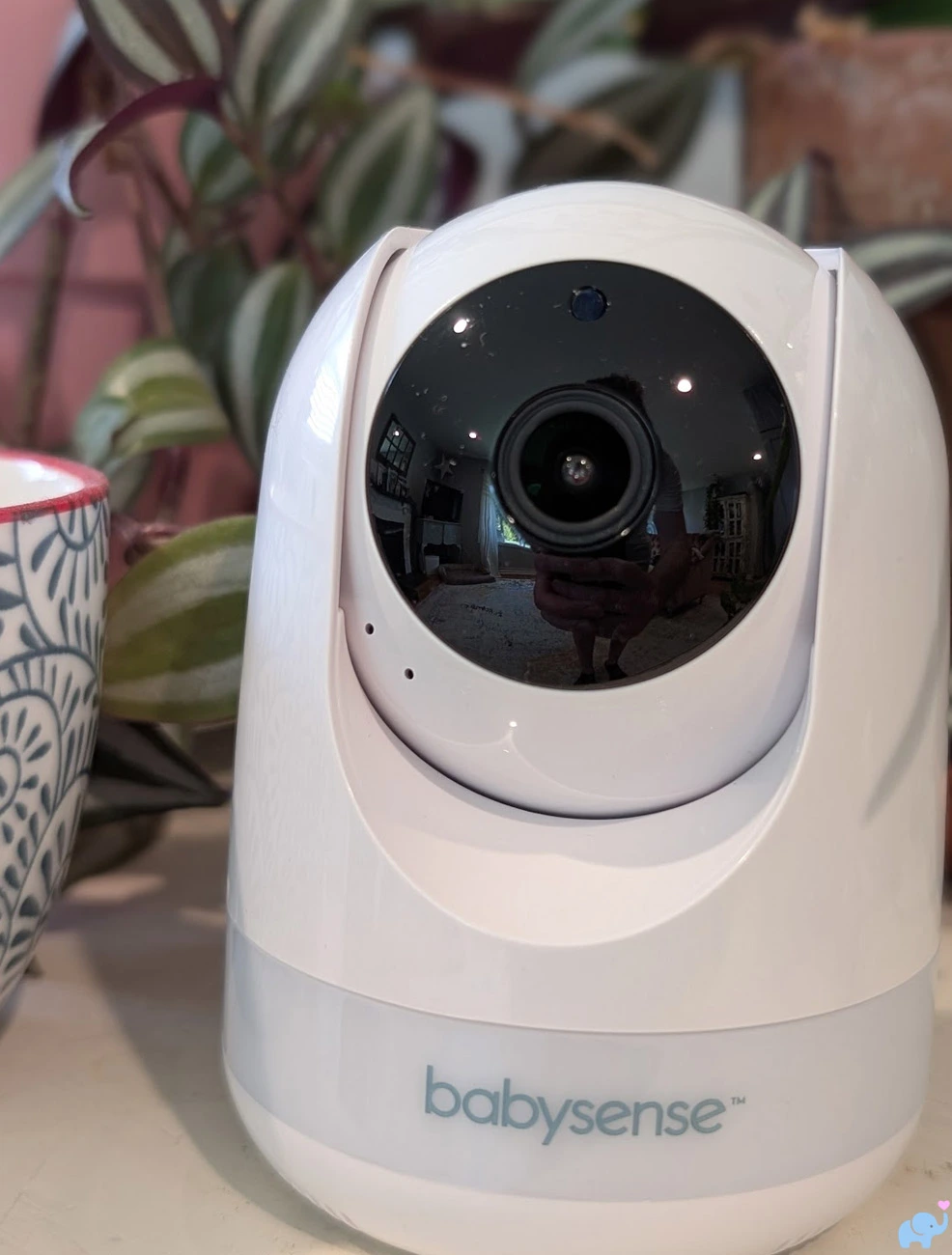
The lens sits inside a rounded motorized head that rotates horizontally and tilts vertically through the directional controls on the parent unit.
The front also contains the infrared night-vision emitters and light sensor.
Babysense describes the camera as providing approximately 360-degree room coverage.
During our hands-on measurements, the head rotated about 340 degrees horizontally.
That leaves a small blind area behind the camera rather than allowing the head to rotate continuously in a complete circle.
Vertical movement was excellent.
The camera tilted downward by approximately 40 degrees and upward by approximately 90 degrees, providing roughly 130 degrees of total vertical adjustment.
This broad range makes it easy to place the camera above, below, or beside the monitored area and then fine-tune the view remotely.
The movement controls were responsive, though they operate in small steps rather than producing the completely fluid motion of a manually adjusted camera.
The motor was audible in a quiet room but not unusually loud for a remotely controlled baby monitor.
The camera position remains fixed until a parent moves it.
There is no automatic motion tracking.
For most crib-monitoring situations, we consider that a benefit rather than a limitation because the camera cannot become distracted by a parent walking through the room and remain aimed away from the baby.
Mounting Options
The base of each camera is unusually versatile.
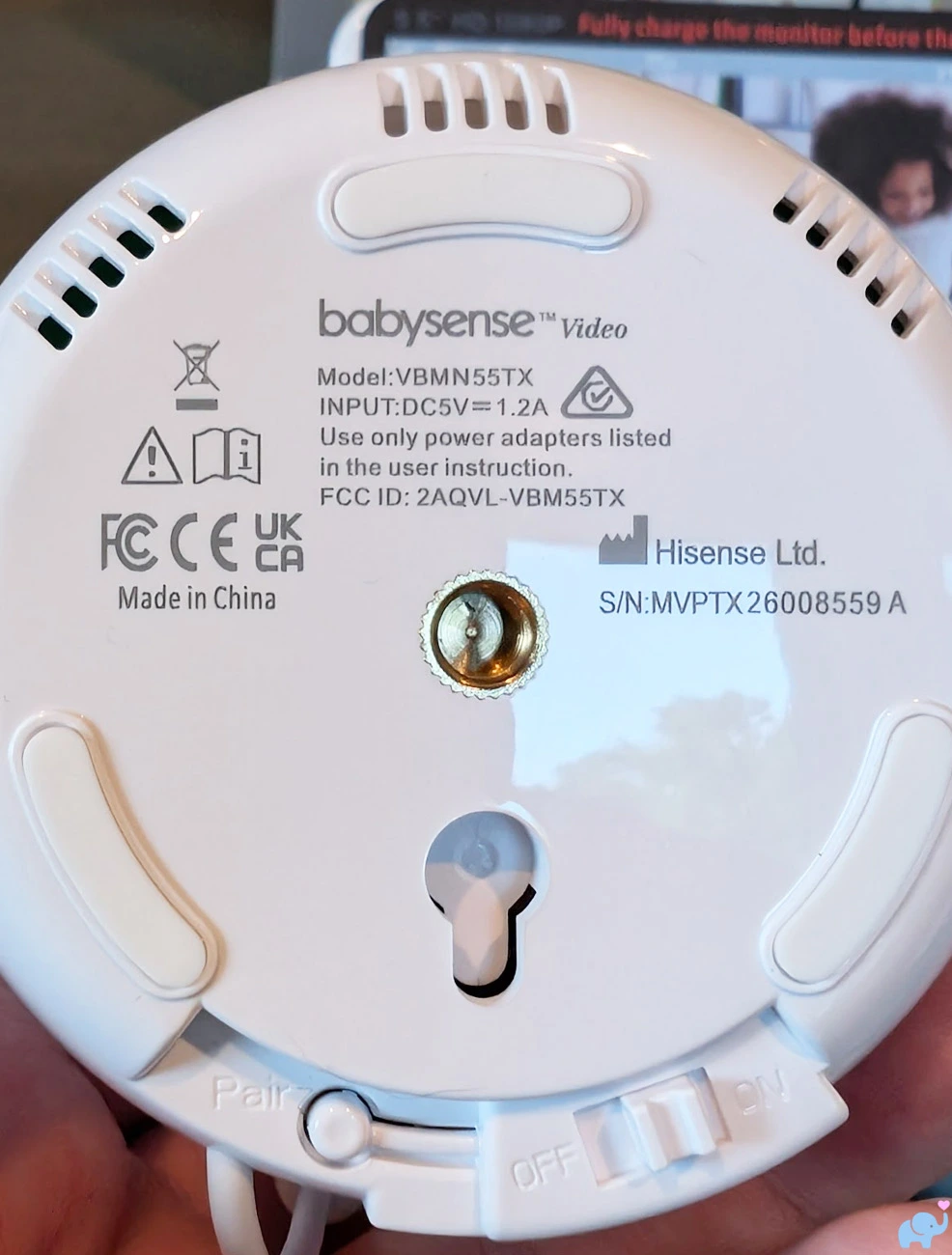
Babysense includes the expected mounting point for its supplied wall hardware.
More importantly, the camera also includes a universal 1/4"-20 UNC threaded socket.
This is the standard mounting thread used by an enormous variety of photography equipment, tripods, camera arms, clamps, suction mounts, flexible gooseneck mounts, and articulating brackets.
That small addition dramatically expands the camera's mounting possibilities.
Depending on the nursery layout, parents can use:
- The included wall screws and anchors.
- A tabletop or dresser.
- A shelf.
- A freestanding tripod.
- A floor stand.
- A clamp mount.
- A suction-cup mount.
- A flexible camera arm.
- An articulating wall arm.
- Another 1/4"-20 compatible camera accessory.
The camera's microphone sensor arm and USB-C power connection extend from the rear of the base.
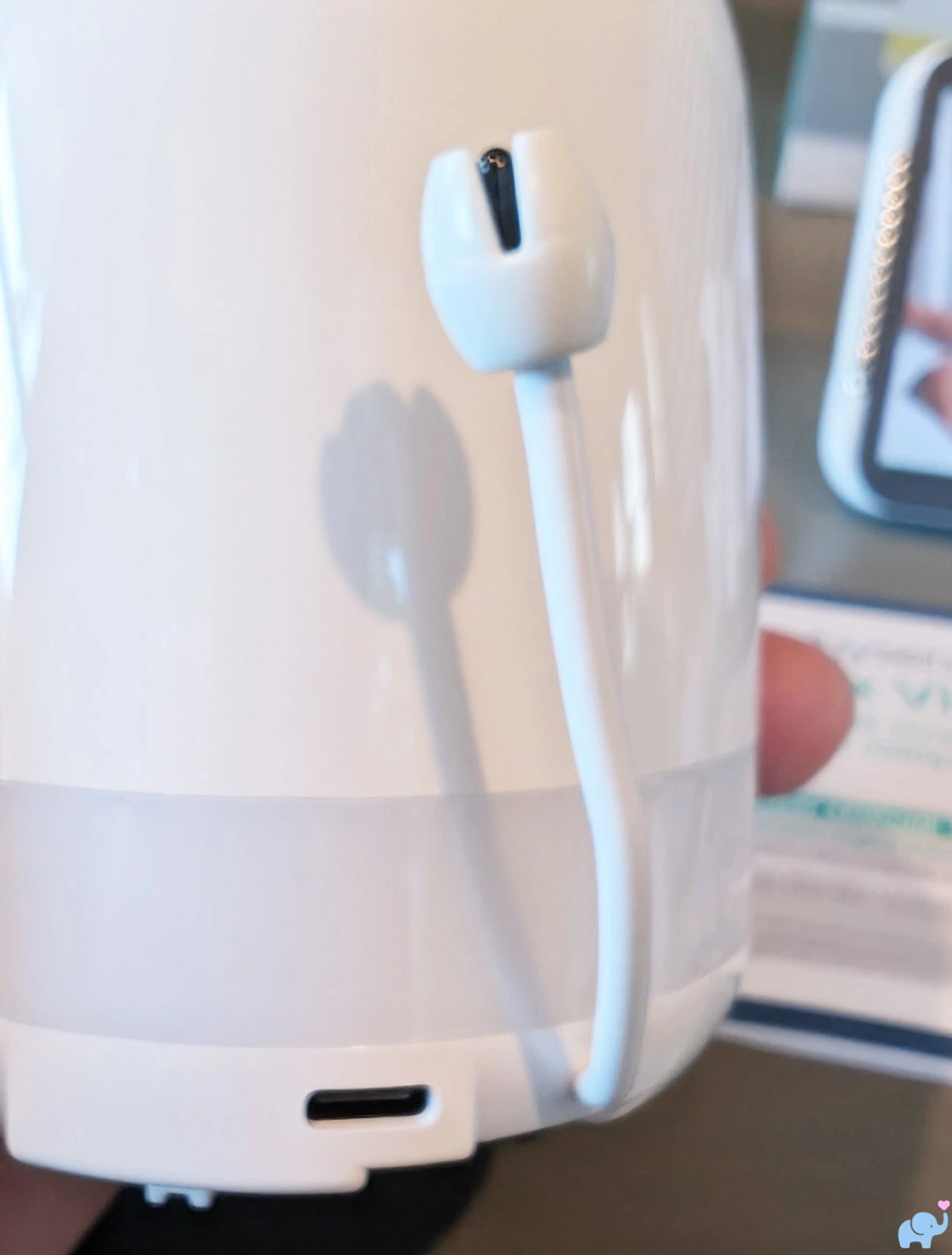
The extended sensor helps measure room temperature away from the heat produced by the camera electronics.
Babysense recommends keeping the camera, power adapter, and all cords at least six feet from the crib and completely outside the child's reach.
Do not attach the camera or power cable to a crib rail unless using a manufacturer-approved system that maintains the required safe distance.
Camera Night Lights
The integrated camera night light was one of our favorite features.
The translucent band around the bottom of each camera creates a soft glow rather than projecting a harsh beam across the room.
Parents can activate the light directly from the dedicated night-light button on the parent unit.
The system provides six colors and three brightness levels.
The blue setting creates a calm, cool-toned glow.
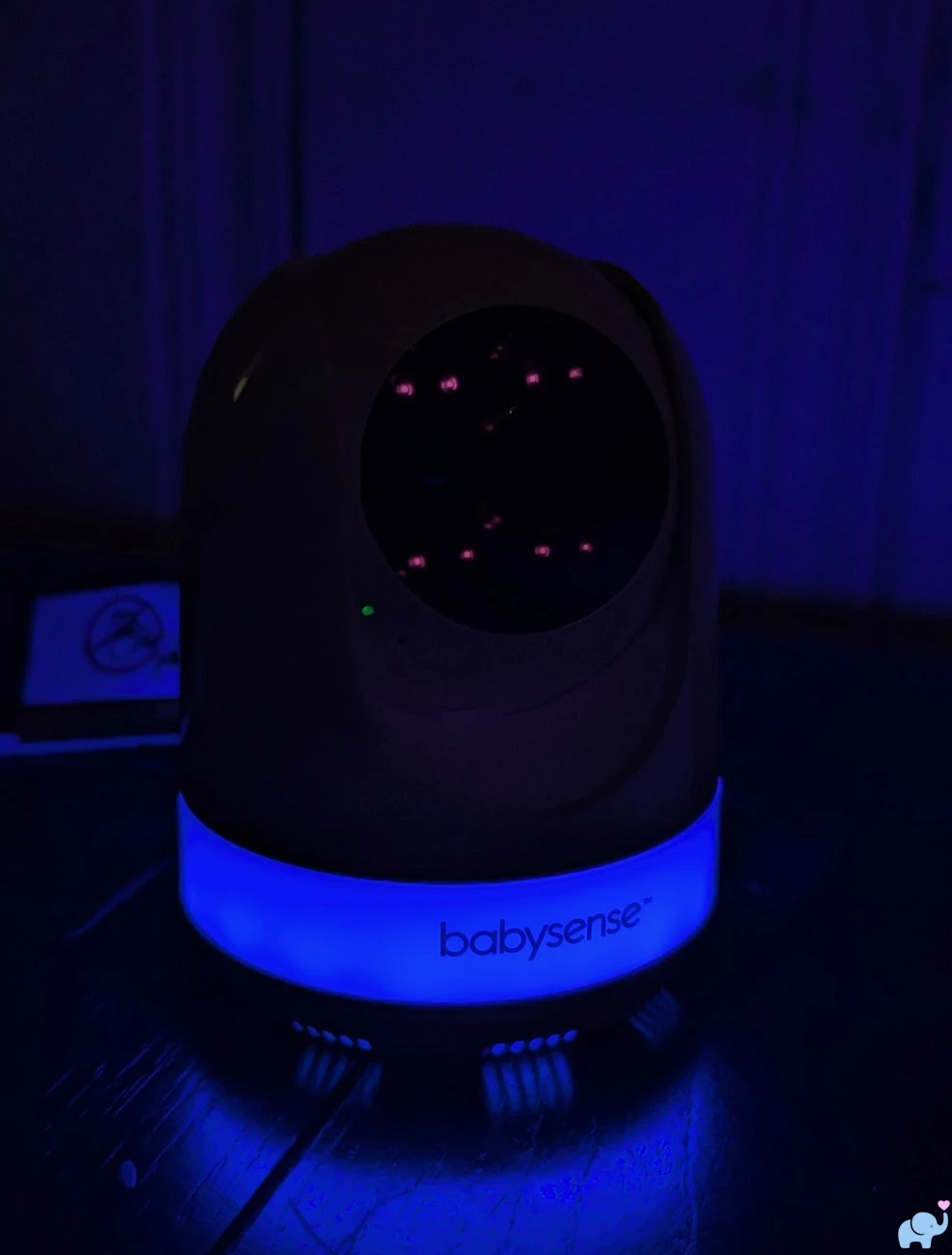
The small red dots visible around the lens in our photograph are the infrared LEDs captured by our camera.
They were not visibly glowing red to the naked eye during ordinary use.
The green night-light option was also soft and evenly distributed around the base.
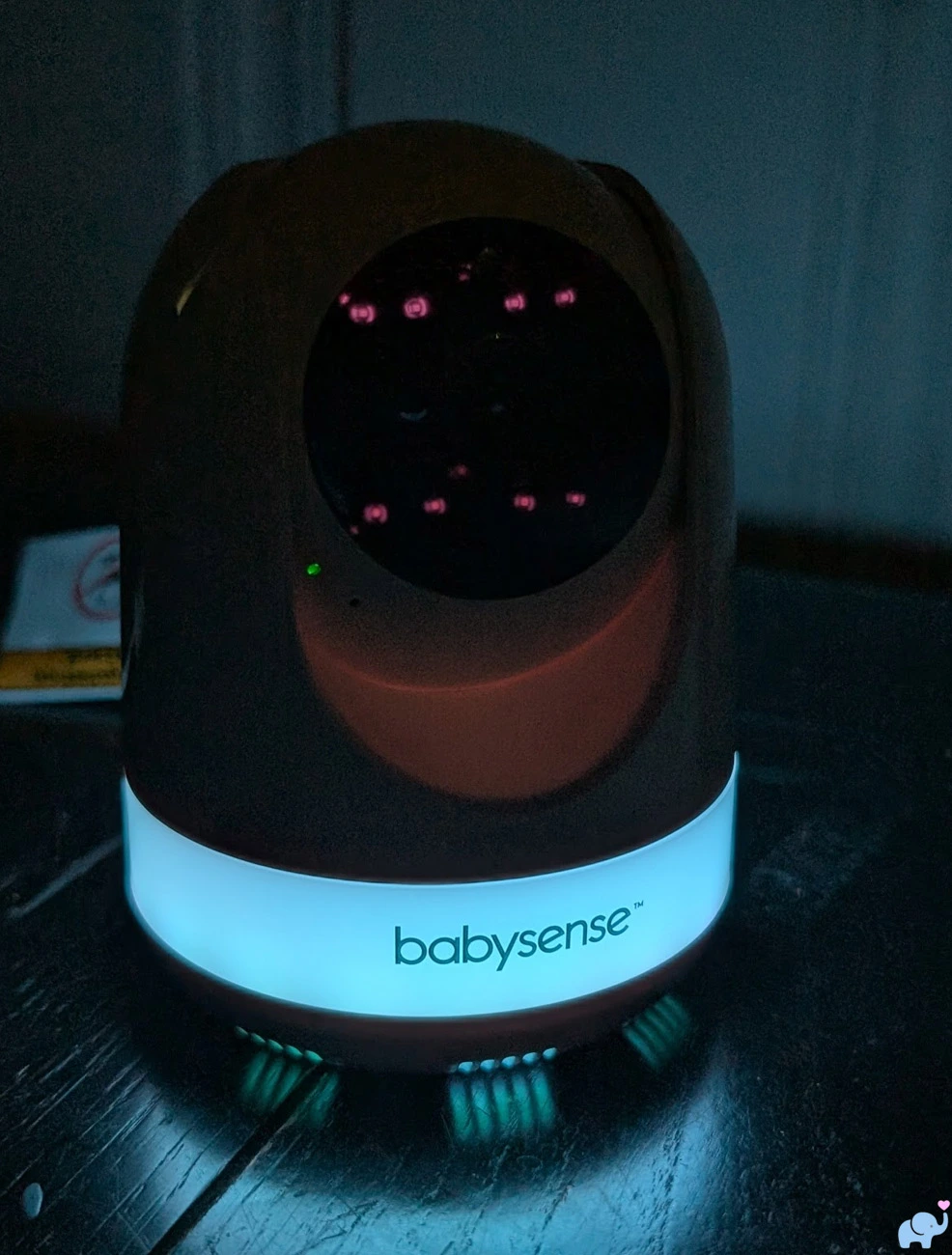
The red mode provides a warmer, less stimulating color that some families may prefer during overnight feedings.
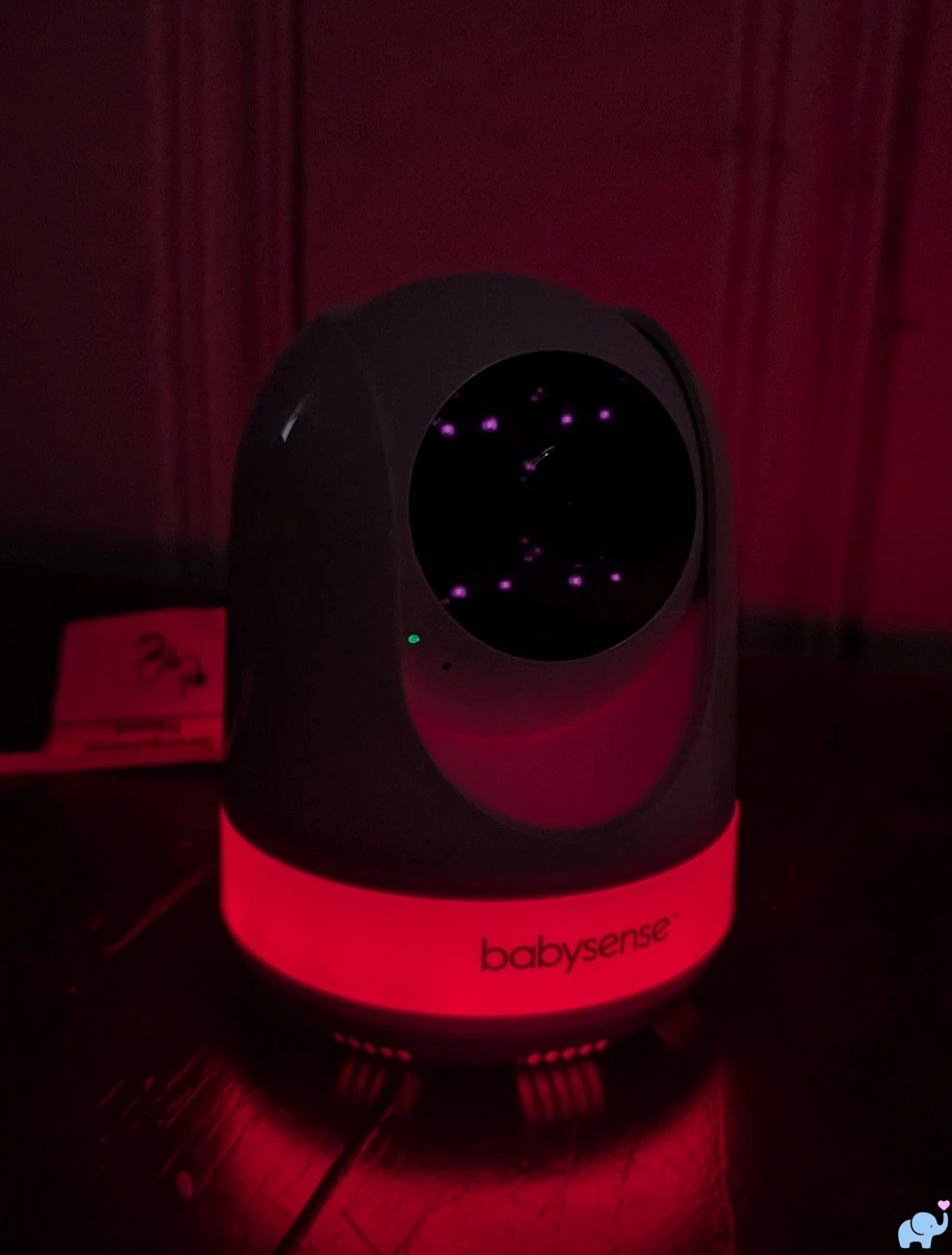
The rainbow setting automatically cycles through all six colors.
We could adjust the color-transition speed among three levels, allowing the changes to occur slowly or more rapidly.
The night light is bright enough to help with feeding, diaper changes, pacifier replacement, or entering the room without turning on an overhead light.
At the lowest brightness, it provides a gentle orientation light without illuminating the entire nursery.
Each camera's night light can be controlled independently by selecting that camera before pressing the night-light button.
Parent Unit & Controls
The parent unit is relatively thin and lightweight considering the size of its screen.
It fits comfortably in a larger pocket, including the type of reasonably sized pocket often found in men's pants.
It may be a more difficult fit in the notoriously tiny pockets commonly found in women's clothing.
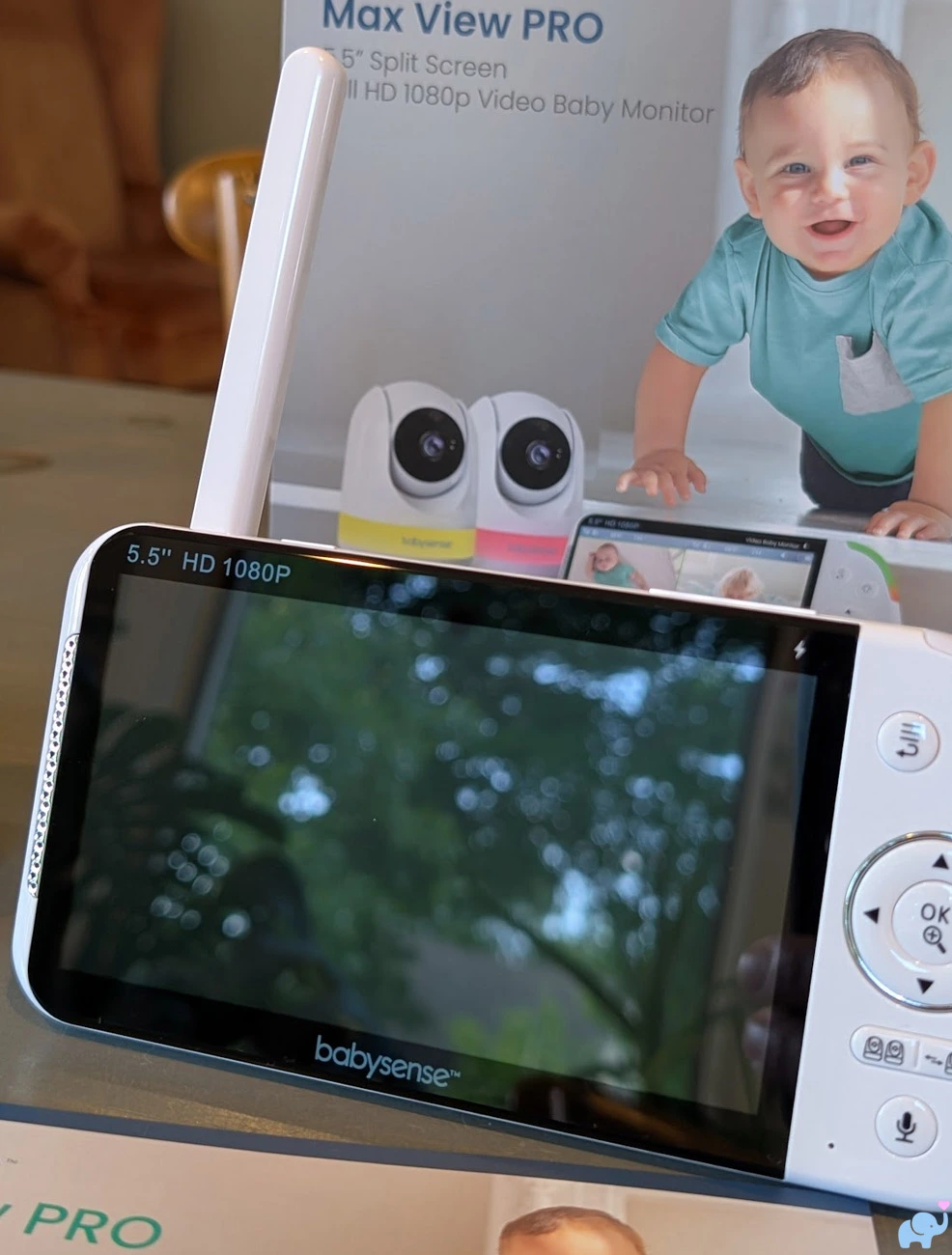
The 5.5-inch display dominates the front of the monitor.
It is bright, crisp, colorful, and large enough to make split-screen monitoring genuinely useful.
The physical controls sit along the right side of the display.
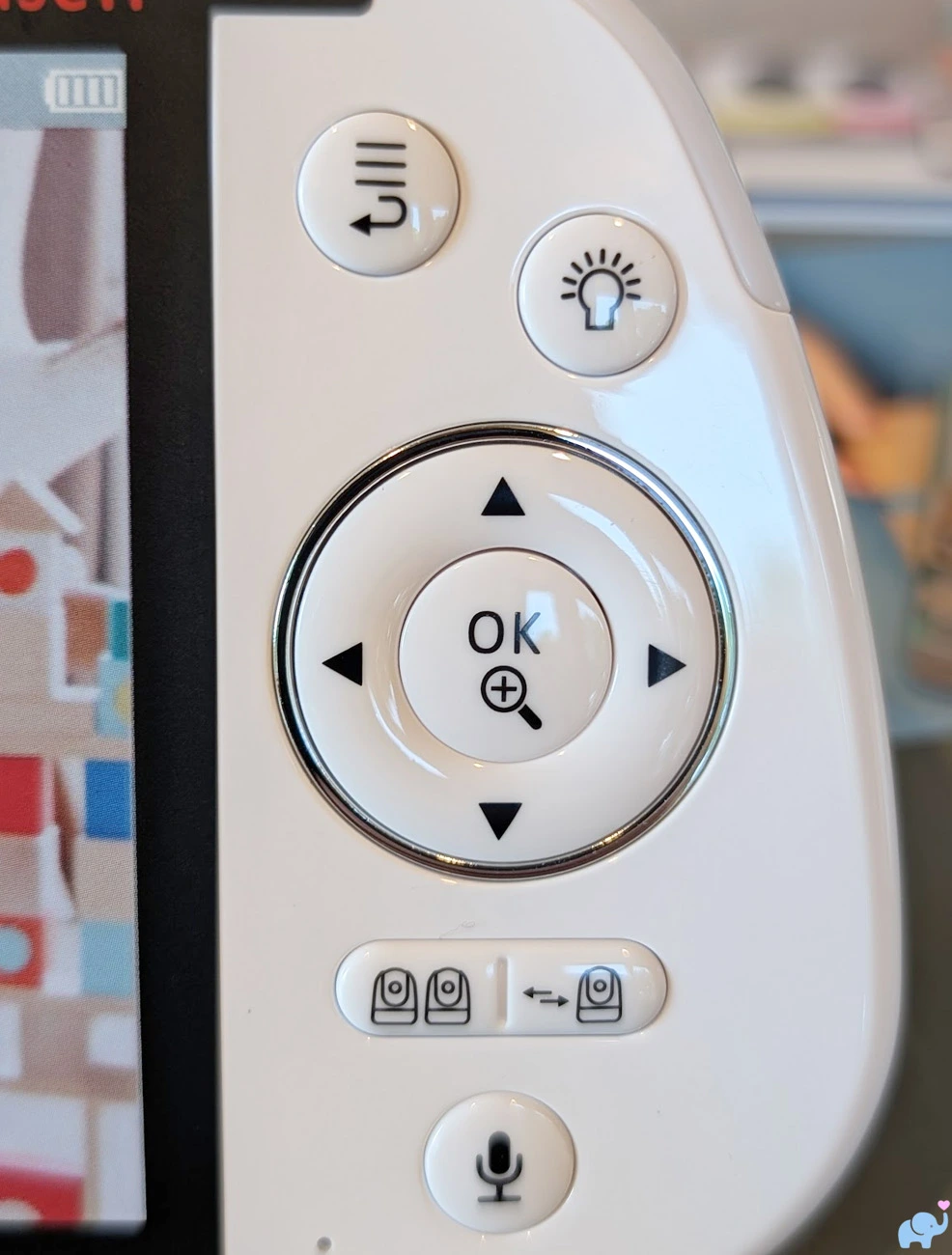
From top to bottom, the main front controls include:
- Menu and exit button.
- Camera night-light button.
- Directional pan, tilt, and menu-navigation controls.
- Center confirmation and zoom button.
- Split-screen button.
- Camera-selection and scan button.
- Two-way intercom button.
Dedicated buttons make the monitor faster to operate than a touchscreen interface with multiple layers of menus.
We could move the camera, change the active audio feed, enter split screen, speak through a camera, or activate the night light without searching through a mobile app.
The identification label on the back of our parent unit lists the model as VBMN55RX.
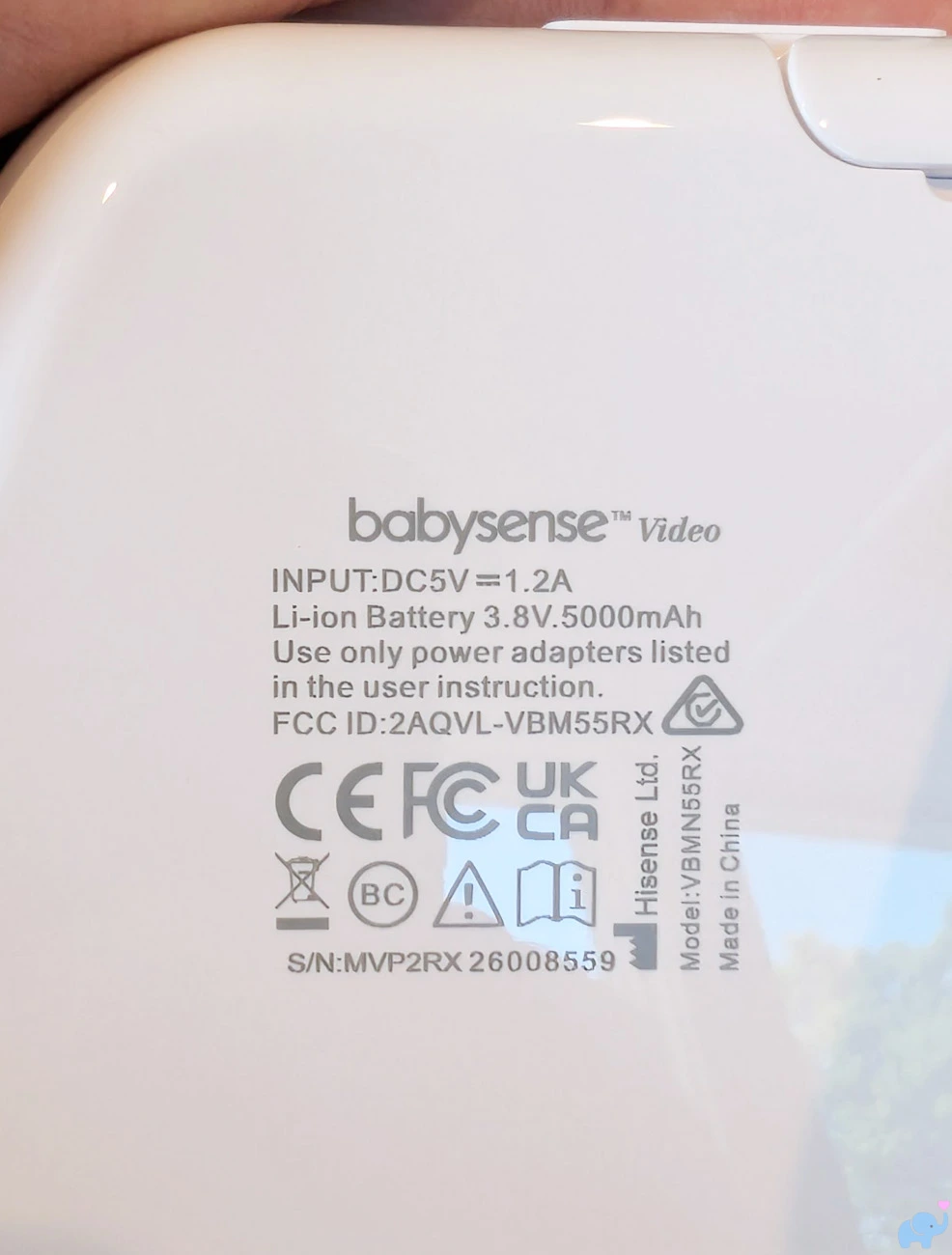
The label includes:
- Model number VBMN55RX.
- Built-in 3.8V, 5000mAh battery.
- Serial number.
- FCC ID 2AQVL-VBM55RX.
- CE marking.
- Made in China label.
The model number is particularly important because the older Max View monitor involved in the 2026 recall uses the similar but different VBM55RX designation.
A folding kickstand on the rear holds the monitor at a useful viewing angle on a nightstand, dresser, kitchen counter, or desk.
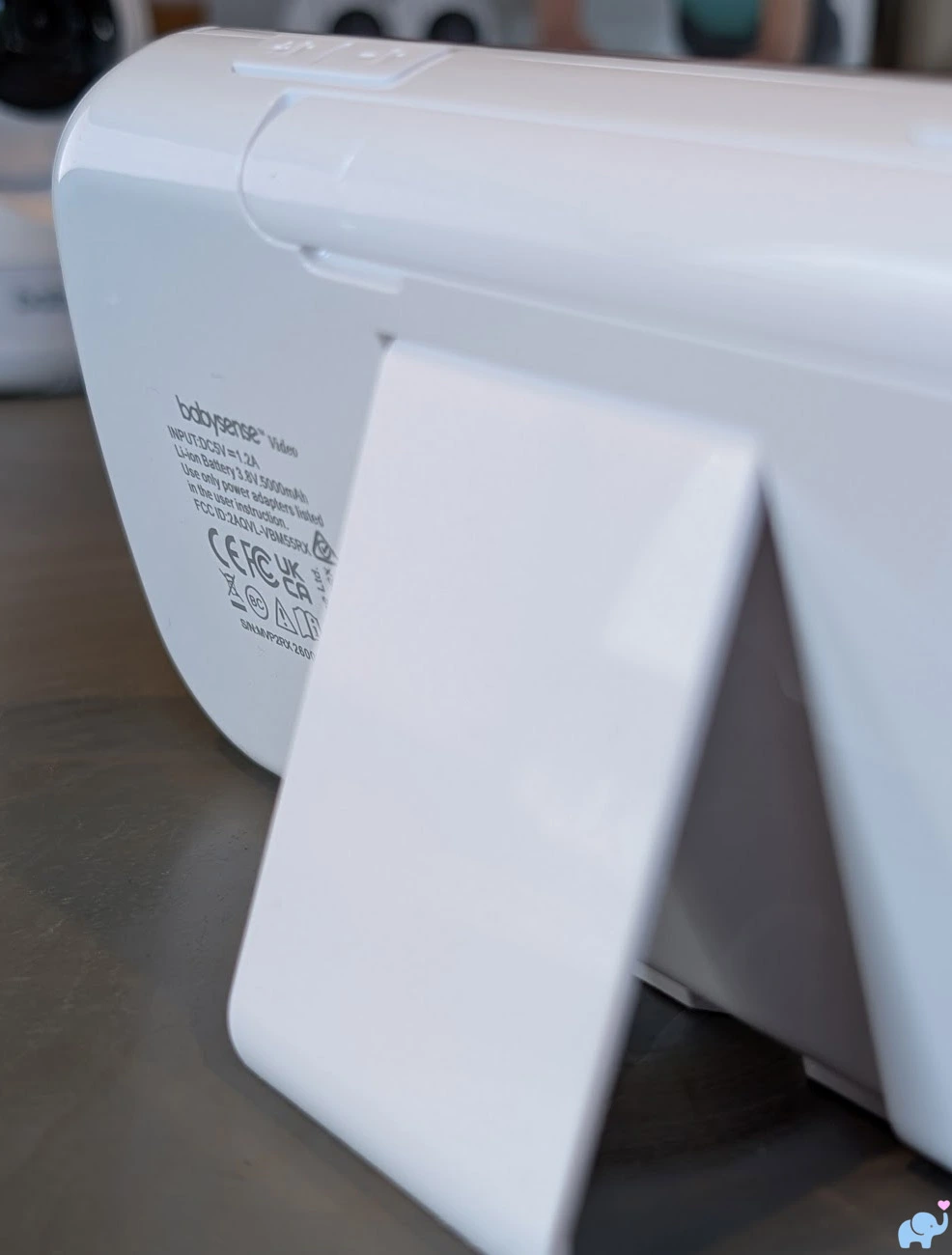
The stand felt stable during ordinary use and folded flat when carrying the monitor.
The top-right corner includes a visual sound meter.
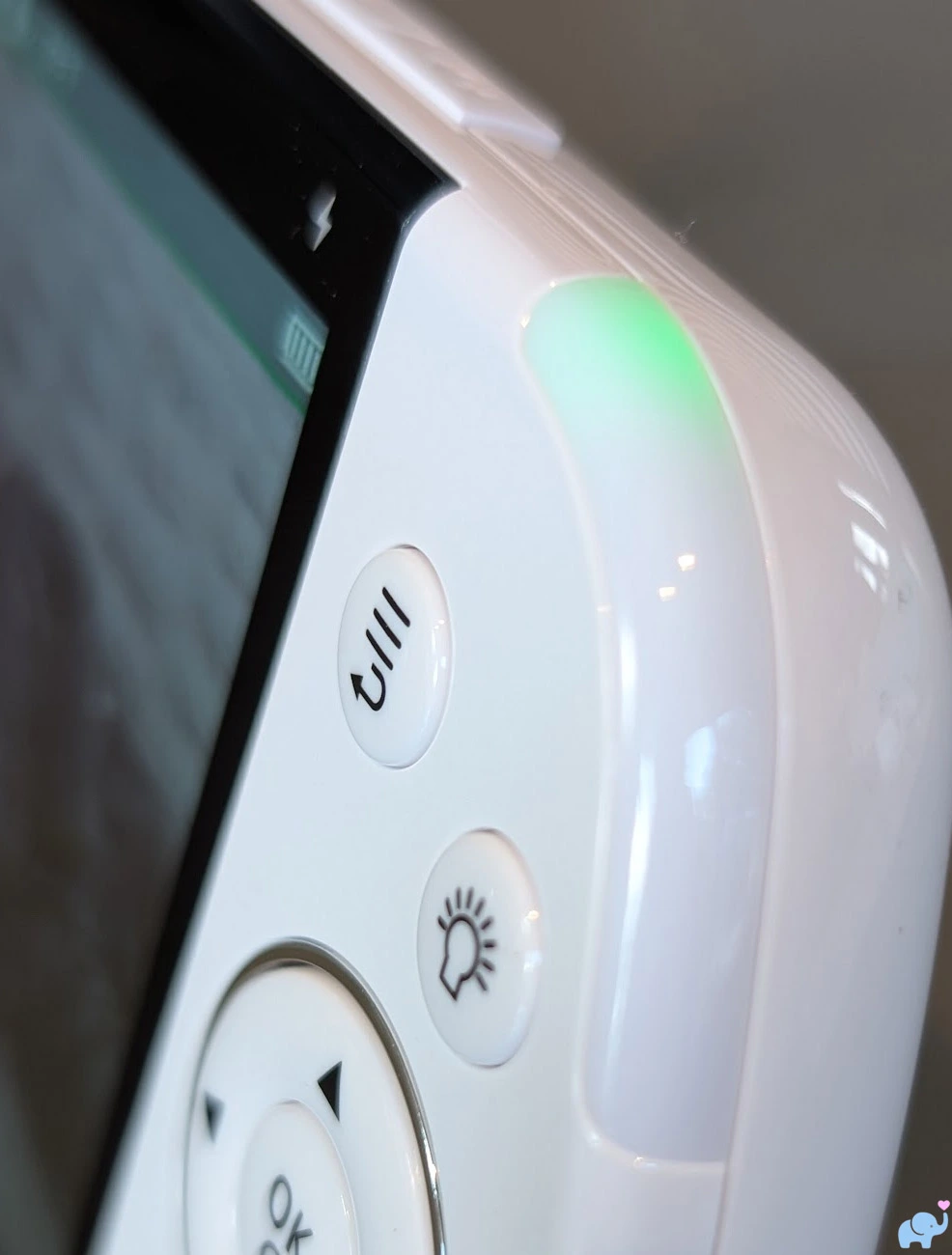
The light remains green when the selected room is quiet, then changes toward orange and red as the detected sound becomes louder.
This is useful when the monitor volume is turned down, though the indicator reflects only the currently active camera audio.
Along the top edge are the volume-down button, volume-up button, power and standby button, and folding antenna.
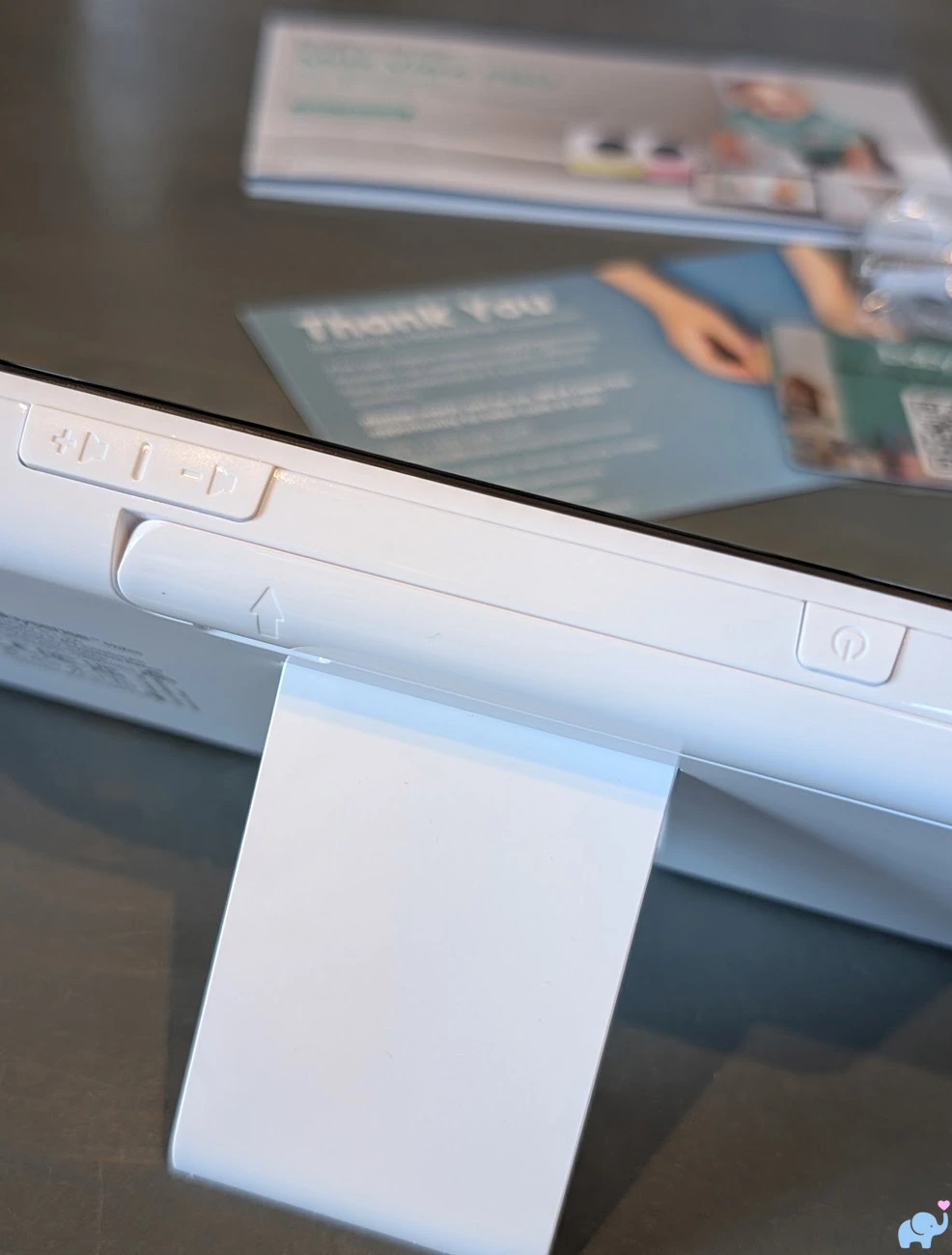
The separate volume buttons are convenient and allow the speaker to be turned completely down without entering the menu.
Daytime Video Quality
Daytime image quality was very good.
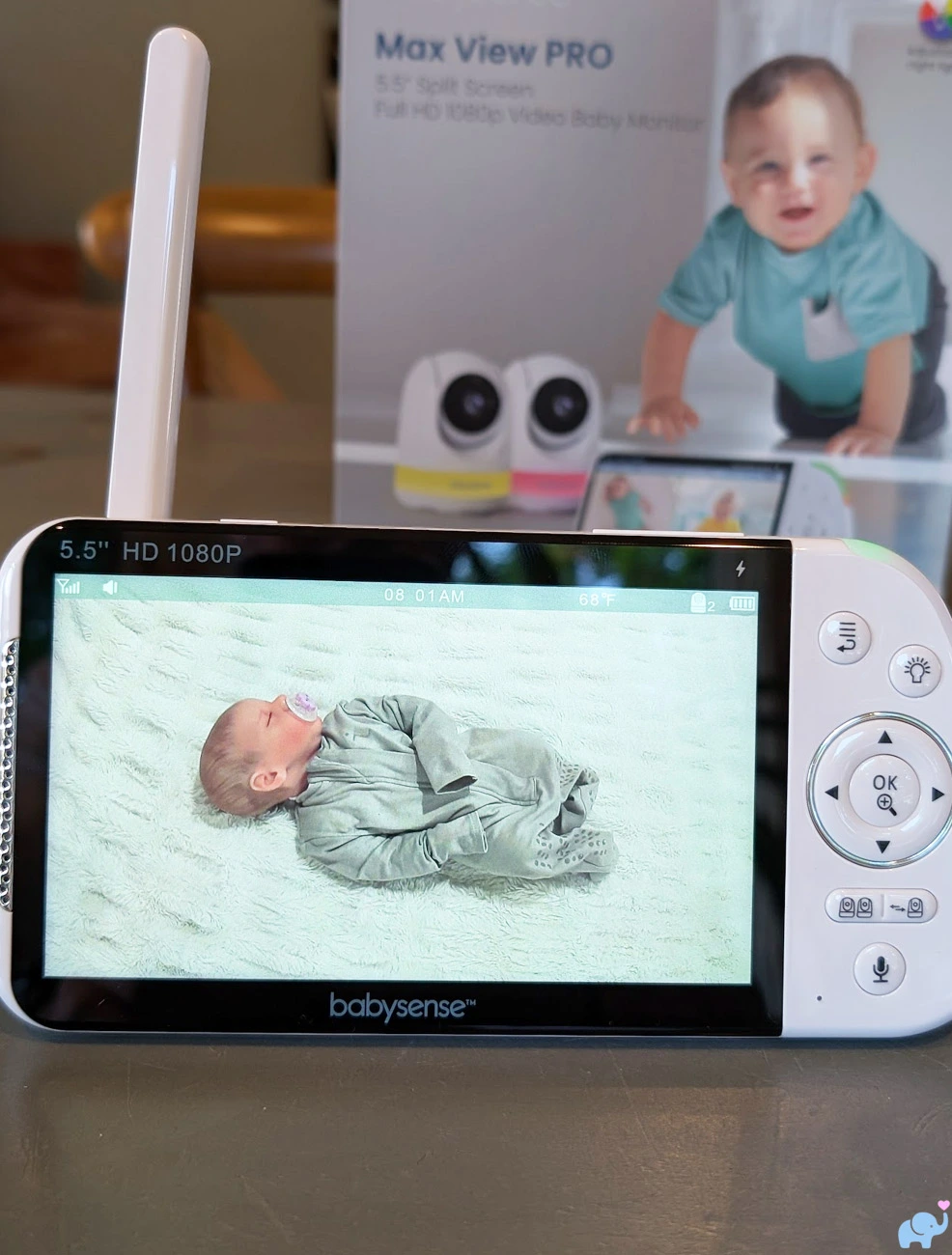
The parent display produced a bright, crisp image with good color contrast, useful detail, and adequate exposure.
We could easily see facial orientation, eye position, body movements, clothing, bedding, crib boundaries, and nearby objects.
The colors were reasonably natural rather than showing the green or purple cast that sometimes appears on less expensive baby monitors.
The large screen also helps the image look more detailed than it would on a smaller 3.5- or 4.3-inch parent unit.
Babysense describes the display as full HD, and the parent screen has a listed resolution of 1920 x 1080 pixels.
As with most dedicated baby monitors, the final image quality still depends on the camera sensor, compression, radio connection, lighting, distance, and amount of digital zoom.
The system does not provide the ultra-fine detail of a high-end smartphone camera, but it is easily sharp enough for ordinary nursery monitoring.
Night Vision & Zoom
When the room becomes dark, the camera automatically switches to greyscale infrared night vision.
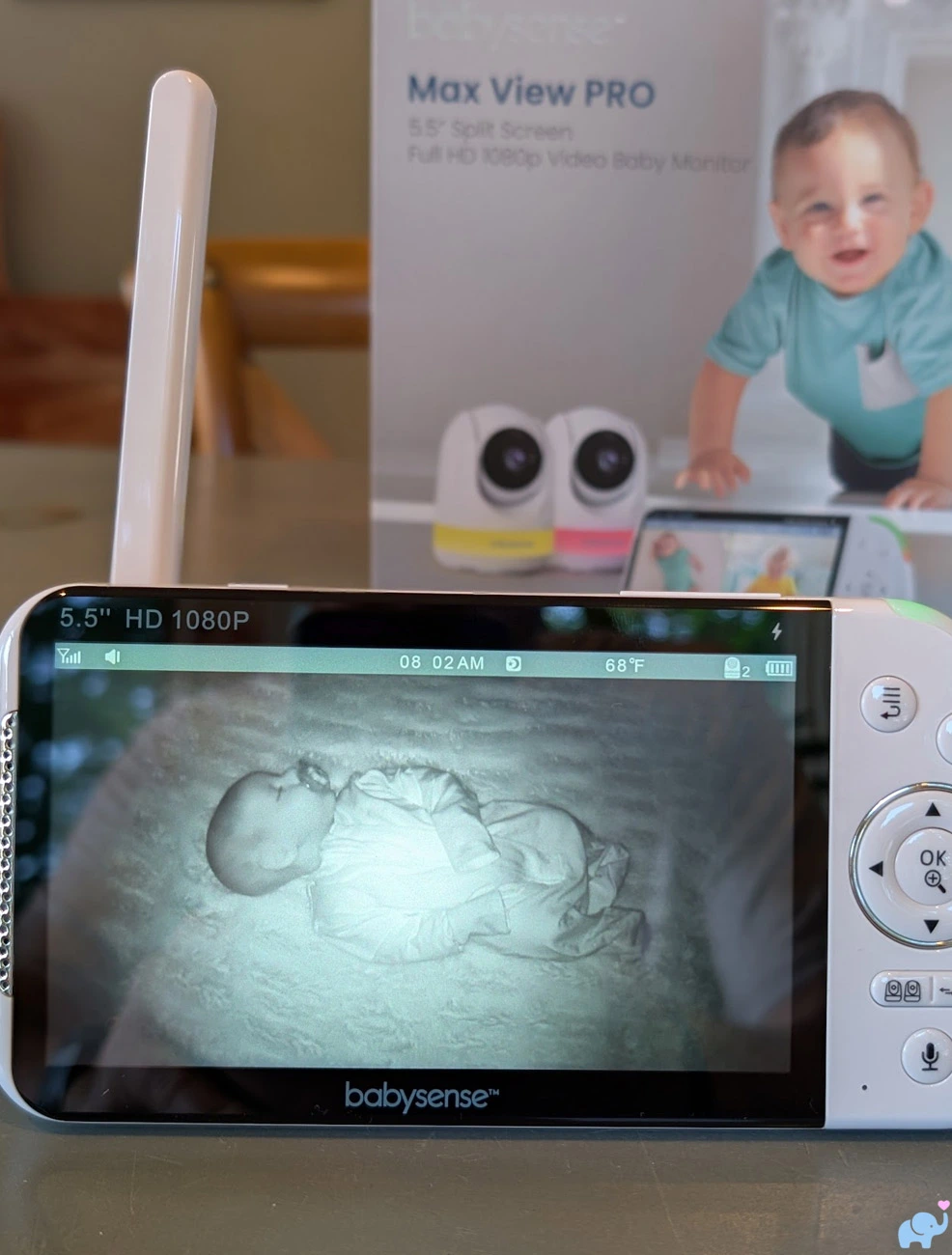
Night vision provided decent resolution and contrast.
We could identify the baby's position, face direction, larger facial features, bedding, crib rails, and movements in a dark room.
As expected, fine details and contrast were reduced compared with daytime video.
Light-colored fabrics could also appear bright or slightly washed out when close to the infrared source.
Overall, night-vision performance was good and entirely suitable for overnight monitoring.
The monitor provides 2x and 4x digital zoom.
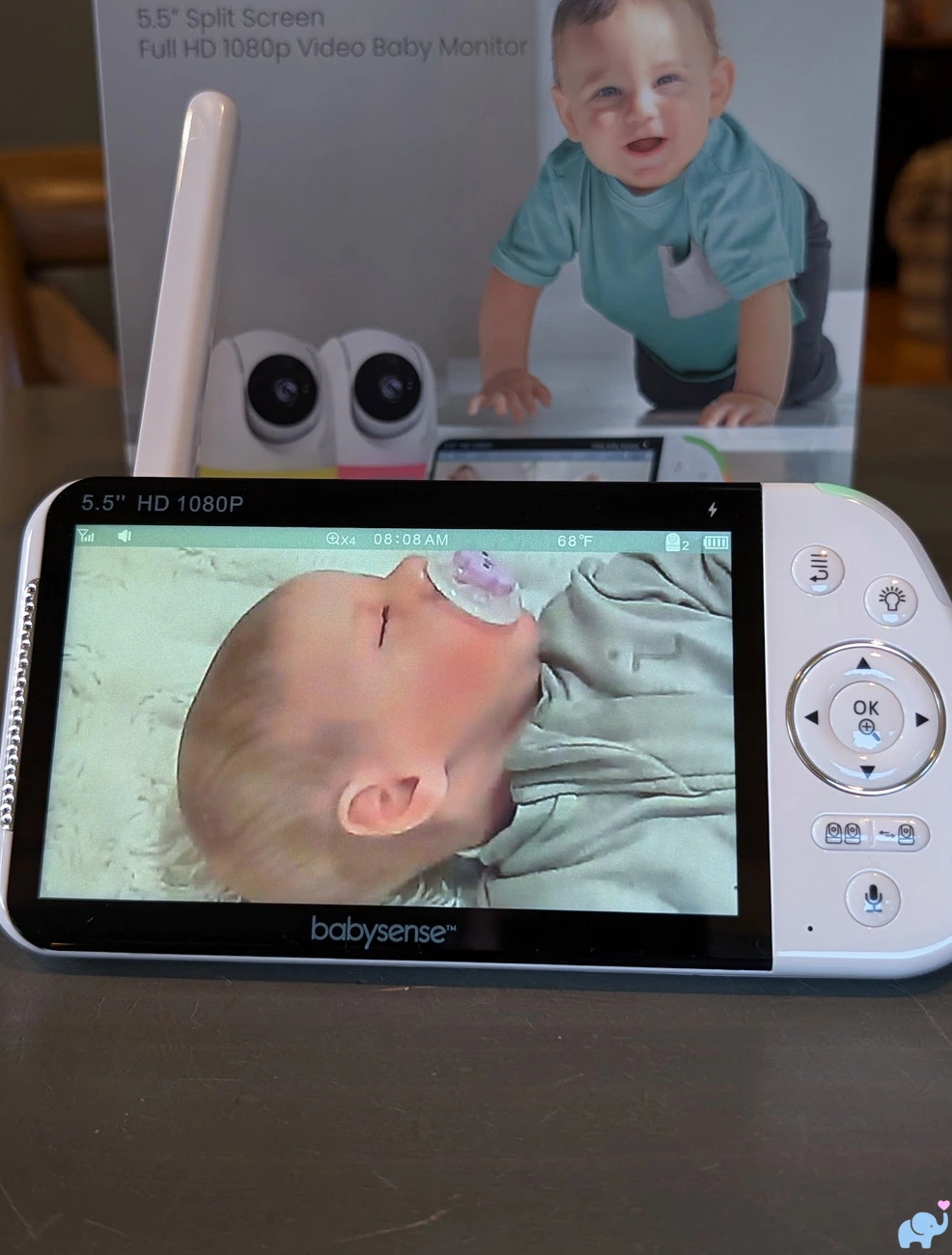
Because the zoom is digital rather than optical, it crops and enlarges the original image.
Some softness and pixelation are therefore unavoidable, especially at 4x.
Even with that limitation, zoom provided enough detail to check whether the baby's eyes were open, locate a pacifier, examine head position, or take a closer look at subtle movements.
Zoom is not available while split-screen mode is active.
To zoom, parents must leave split screen, select an individual camera, and press the center zoom button.
Any selected zoom level is lost when returning to split screen.
That makes sense from an interface and processing perspective, but it is inconvenient for parents who want a closer view of both children simultaneously.
Split Screen & Multiple Cameras
Split-screen monitoring is the most important feature.
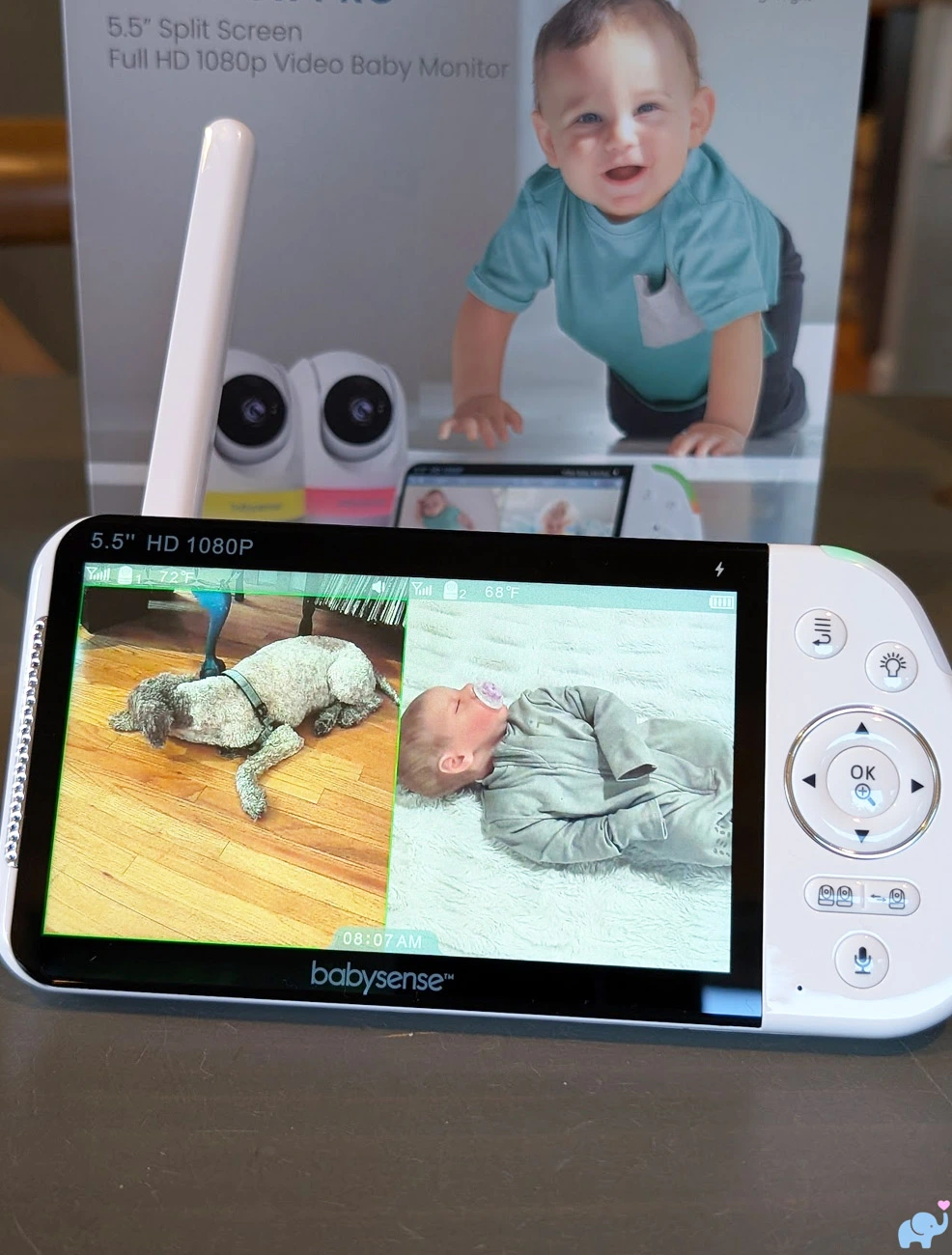
Both camera feeds appear side by side on the same 5.5-inch display.
In our example, one camera watched the baby while the second kept an eye on our puppy.
The feature is equally useful for:
- Twins in separate cribs.
- Siblings in different bedrooms.
- A baby in the nursery and toddler in a playroom.
- A crib and bassinet in separate locations.
- Monitoring a sleeping child and pet.
- Watching two areas of a large room.
The selected camera is indicated by a green border.
That selection determines which camera provides audio, receives intercom speech, responds to night-light controls, and moves when the directional buttons are pressed.
Parents can switch the green selection between the two feeds and pan or tilt each camera individually without leaving split screen.
This was excellent.
Many monitors force parents to open one camera full screen before changing its position.
The Max View Pro allows either camera to be reframed while both children remain visible.
There are two important limitations.
First, only one camera provides audio at a time.
You cannot listen to both rooms simultaneously, and you cannot speak through both cameras simultaneously.
Second, zoom is disabled in split screen.
The system also includes a separate scan mode.
Rather than showing two feeds side by side, scan mode cycles through the paired cameras one at a time.
In our testing, the change occurred at approximately ten-second intervals.
Babysense documentation describes a longer interval of approximately 15 to 20 seconds, so timing may vary by software version or measurement method.
Scan mode is useful when parents want each camera to use the full display and want the active audio to rotate between rooms automatically.
The parent unit supports up to four cameras.
When four are paired, split-screen mode displays cameras one and two together, then cameras three and four together in a separate paired view.
It does not display four reduced-size feeds simultaneously.
Reception & Range
Babysense advertises an open-field range of approximately 1,000 feet.
As with every radio baby monitor, that maximum assumes an open space without walls, floors, furniture, appliances, trees, vehicles, or a person's body obstructing the signal.
Our real-world household results were considerably shorter but still very good.
Inside our home, the monitor maintained a reliable connection:
- From the first floor to the third floor.
- From the basement to the second floor.
- Across multiple interior walls.
- Through ceilings and floors.
- From indoor cameras to the backyard.
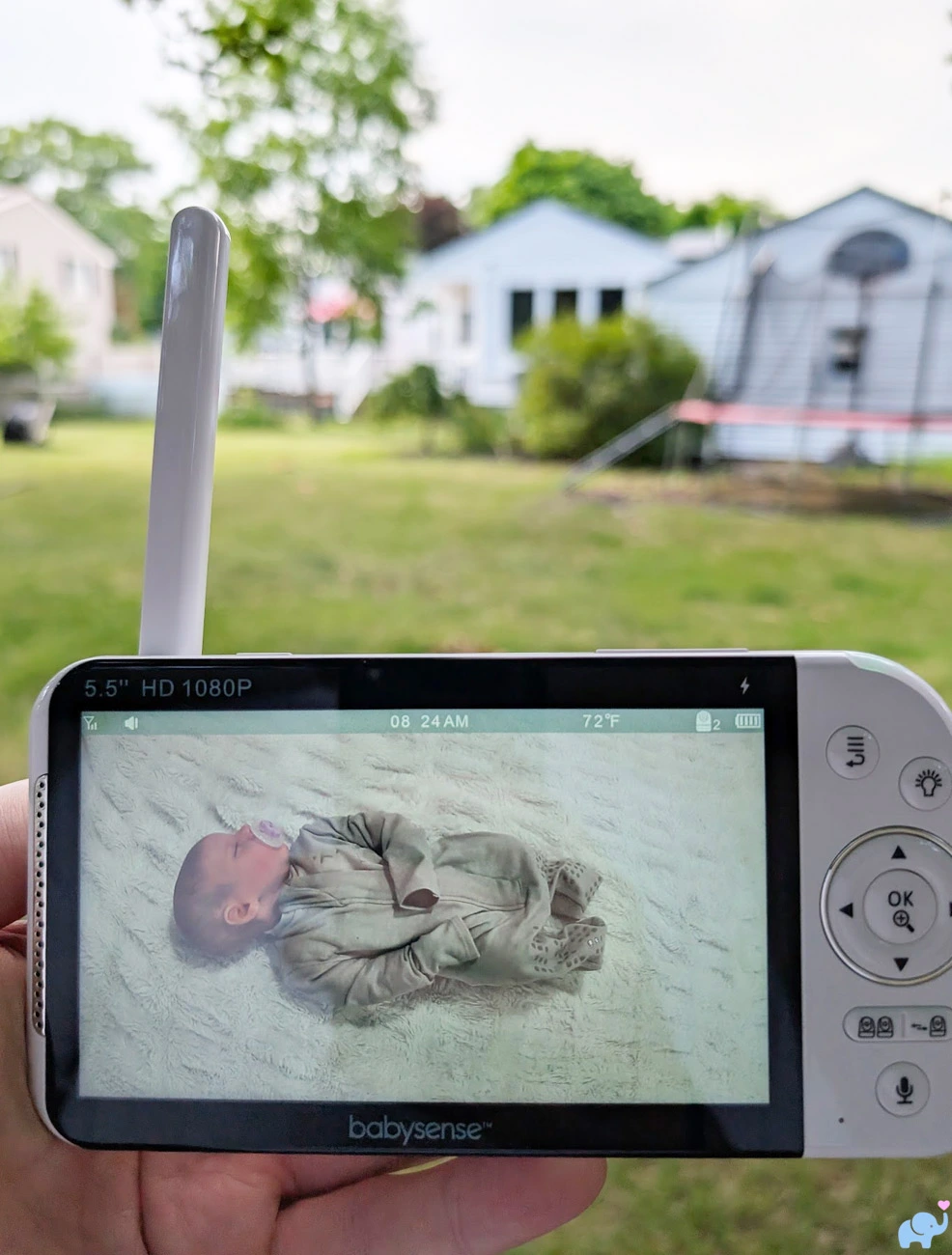
For our first outdoor test, we placed a camera in the basement and walked into the backyard with the parent display.
The signal remained connected at approximately 70 feet from the house as long as we faced the building.
When we turned around and placed our body between the parent unit and house, the connection could drop.
The human body contains a substantial amount of water and can attenuate a 2.4GHz radio signal, so this result was not especially surprising.
For our second test, we moved the camera to the first floor.
With fewer layers of the building obstructing the signal, we reached approximately 150 feet into the backyard before losing reception.
These results will vary considerably by home construction.
Brick, concrete, metal siding, foil-backed insulation, radiant barriers, appliances, mirrors, and other 2.4GHz devices may reduce the range.
Wood framing and drywall generally allow a stronger connection.
Overall, it provided enough range for our entire multi-level home and a substantial portion of the surrounding yard.
Audio, Intercom, & Sound Meter
Audio from the selected camera was clear enough to hear crying, talking, movement, and ordinary nursery sounds.
Volume is adjusted using dedicated buttons on the top of the parent unit.
The volume can be reduced all the way to silent.
This is important because briefly pressing the power button turns off the display but leaves the audio active.
Parents who want both the screen and speaker quiet can blank the display and then reduce the volume to zero.
The visual sound meter remains useful when the speaker is muted.
The indicator changes from green toward orange and red as the selected camera detects louder sound.
Two-way talk is activated by pressing and holding the intercom button.
Speech is transmitted only through the currently selected camera.
The intercom is half-duplex rather than full-duplex.
That means the parent unit cannot receive room audio while the talk button is being held.
Normal listening resumes after the button is released.
This is common among dedicated baby monitors but can make rapid back-and-forth conversation feel less natural than a telephone call.
The camera can also play five lullabies and white noise.
Parents can control playback duration and volume through the parent-unit menu.
Continuous white noise produced by the camera itself or a separate nursery sound machine may prevent VOX mode from entering standby, depending on the sound level and sensitivity setting.
VOX Mode & Standby
VOX mode is designed to conserve battery and keep the bedroom dark by turning off video and audio transmission when the room remains quiet.
The system provides low, medium, and high sensitivity settings.
When no sound exceeds the selected threshold for approximately 30 seconds, the display enters standby.
When sufficient sound is detected, the screen and audio reactivate.
The sensitivity labels can be slightly counterintuitive:
- Low sensitivity requires a louder sound to activate the monitor.
- Medium sensitivity responds to a moderate sound level.
- High sensitivity responds to relatively quiet sounds.
VOX is most useful in a quiet nursery.
A sound machine, fan, air purifier, heater, humidifier, or other continuous noise source may keep the monitor awake or trigger it repeatedly.
The monitor does not produce a separate crying alarm when VOX is activated.
Instead, the screen turns on and live room audio resumes.
This may be enough for light sleepers, but parents who need a loud warning beep to wake them should not assume this baby monitor provides one.
Our most important concern involved two-camera VOX performance.
The official manual states that sound from either camera should wake the display and show the corresponding camera.
During our testing, VOX appeared to work only with the camera currently selected by the green border.
We made noise near the unselected camera, but the parent display did not activate.
We repeated the test and observed the same behavior.
Several factors could potentially explain this discrepancy, including firmware version, whether scan mode was active, selected camera state, sensitivity, ambient noise, or an issue specific to our unit.
For that reason, we are not concluding that every Max View Pro behaves this way.
However, families monitoring twins or children in separate rooms should perform a simple overnight test:
- Activate VOX mode.
- Confirm both cameras are paired and operating.
- Allow the parent display to enter standby.
- Make noise at camera one and confirm that it wakes.
- Repeat the process at camera two.
- Repeat with the opposite camera selected.
- Test again with scan mode enabled.
Do not rely on multi-room VOX until both cameras have been tested successfully under the same settings and background-noise conditions that will be used overnight.
Temperature Monitoring
Each camera includes a temperature sensor mounted on a small extended arm.
The current temperature appears on the parent display and can be shown in either Fahrenheit or Celsius.
During our testing, the monitor's reading closely matched our separate room thermometer.
Parents can set high and low temperature alerts in one-degree increments.
This is more useful than monitors that provide only fixed warning thresholds.
The sensor should be extended away from the camera housing and placed where air can circulate freely.
Placing the camera in direct sunlight, above a heating vent, beside a cold window, in a closed shelf, or very close to another electronic device may distort the reading.
The temperature measurement is useful for identifying meaningful nursery changes, but it should not be treated as laboratory-grade environmental monitoring.
A separate thermometer positioned near crib-mattress height may provide a better measurement of the exact conditions experienced by the baby.
Battery & Charging
The parent unit contains a built-in 3.8V, 5000mAh lithium-ion battery.
Babysense advertises up to approximately 20 hours of operation under power-saving conditions.
Actual battery life will depend on:
- Screen brightness.
- Speaker volume.
- VOX use.
- Continuous versus intermittent video.
- Split-screen use.
- Night-light controls.
- Battery age.
- Signal strength.
- Ambient temperature.
Continuous screen use will drain the battery considerably faster than VOX standby.
The official manual states that a complete charge takes approximately eight hours.
That is relatively slow for a modern USB-C device.
The parent unit can continue operating while connected to power.
The battery is built in and is not intended to be replaced by the user.
This is a disadvantage compared with the Infant Optics DXR-8 Pro, whose battery can be removed and replaced when its capacity eventually declines.
Babysense specifically instructs owners to use the supplied power adapters.
We recommend keeping the original adapters with the monitor rather than assuming that every USB-C charger is appropriate.
Privacy, Security, & Recall Information
The Max View Pro does not connect to the internet.
The cameras transmit directly to the included parent unit using a local 2.4GHz FHSS connection.
That means there is:
- No camera account to compromise.
- No cloud password.
- No remote app login.
- No video uploaded to a company server.
- No subscription service.
- No dependence on internet availability.
- No app that could lose background permissions.
This architecture substantially reduces the remote-access risks associated with internet-connected nursery cameras.
Babysense markets the system as hack-proof.
We generally avoid treating any wireless electronic product as literally impossible to intercept or compromise.
A more precise description is that this baby monitor uses a private, local, frequency-hopping connection with a much smaller remote attack surface than a cloud-connected camera.
The tradeoff is that parents cannot view the camera from work, while traveling, or through a smartphone outside the monitor's radio range.
Important Max View Recall Distinction
In February 2026, the U.S. Consumer Product Safety Commission announced a recall involving approximately 81,800 older Babysense Max View baby monitors.
The recalled parent units could overheat or spark while charging, creating a fire hazard.
The recall covers the older Max View product model VBM55 and parent-unit model VBM55RX.
The Max View Pro reviewed here uses product model VBMN55 and parent-unit model VBMN55RX.
Notice the additional letter “N” in the Pro model number.
| Monitor Version | Identification |
|---|---|
| Older recalled Max View | Product model VBM55 and parent unit VBM55RX |
| New Max View Pro reviewed here | Product model VBMN55 and parent unit VBMN55RX |
Our tested parent unit is labeled VBMN55RX and is not the VBM55RX model identified in the CPSC recall.
Because the names and physical appearances are similar, owners should verify the model label on the back of the parent unit rather than relying on the product name, box, appearance, or online listing.
Anyone who owns a unit labeled VBM55RX should stop using the recalled display and follow the current CPSC and Babysense recall instructions.
Babysense Max View Pro vs. Infant Optics DXR-8 Pro
The Infant Optics DXR-8 Pro is one of the Max View Pro's most important competitors.
Both are dedicated non-WiFi baby monitors with handheld displays, remote camera movement, night vision, two-way talk, temperature monitoring, and support for multiple cameras.
However, they prioritize different strengths.
| Feature | Babysense Max View Pro | Infant Optics DXR-8 Pro |
|---|---|---|
| Connection | Private non-WiFi FHSS connection | Private non-WiFi closed-loop connection |
| Cameras in standard package | Two in the tested bundle | One in the standard full kit |
| Maximum cameras | Up to four | Up to four |
| Screen size | 5.5 inches | 5 inches |
| Screen resolution | 1920 x 1080 | 720p |
| Simultaneous split screen | Yes, two live feeds | No on the standard DXR-8 Pro; camera scan instead |
| Multiple-camera audio | One selected camera at a time | One camera at a time through scan or selection |
| Camera movement | Remote pan and tilt; approximately 340-degree pan in our testing | Remote pan and tilt |
| Zoom | 2x and 4x digital zoom | Digital zoom plus included interchangeable optical zoom lens |
| Interchangeable lenses | No | Yes, including zoom and optional wide-angle lenses |
| Active Noise Reduction | No | Yes, filters steady fan, heater, and air-purifier noise |
| Camera night light | Six colors, three brightness levels, and rainbow mode | No comparable multicolor camera night light |
| Lullabies and white noise | Included | Not a primary feature |
| Temperature monitoring | Yes, with adjustable high and low alerts | Yes |
| Battery | Built-in 5000mAh battery | User-replaceable 3000mAh battery |
| Advertised range | Up to approximately 1,000 feet in open space | Up to approximately 1,000 feet in open space |
| Best for | Twins, siblings, two simultaneous rooms, larger screen, and night-light features | Audio clarity, interchangeable lenses, established reliability, and replaceable battery |
The Max View Pro is the better choice for twins or siblings because it includes two cameras and displays both feeds simultaneously on its larger, sharper screen. It also adds colorful night lights and built-in sleep sounds.
The standard DXR-8 Pro cycles between cameras rather than showing them side by side, though the newer DXR-8 Pro SS adds split-screen capability. Its advantages include Active Noise Reduction, interchangeable lenses, and a replaceable battery.
Choose the Max View Pro for two-camera viewing or the DXR-8 Pro for stronger audio filtering, lens flexibility, and long-term battery serviceability.
User & Reddit Sentiment
Early sentiment toward the Max View Pro is generally positive, though the product is newer than the original Max View and there is still a limited amount of long-term Pro-specific feedback.
Owners most frequently praise:
- The clear 5.5-inch screen.
- The ability to see two children at once.
- The non-WiFi connection.
- The lack of an app or subscription.
- The daytime picture.
- The infrared night image.
- The camera movement.
- The night-light feature.
- The indoor range.
- The simple plug-and-play setup.
- Babysense customer support.
Parents of twins and children in separate rooms appear especially enthusiastic about split screen.
Several Reddit owners describe the Pro image as clear enough to see subtle breathing movement and appreciate being able to hand a dedicated monitor between caregivers without sharing a phone or app account.
Common criticisms and concerns include:
- Only one camera provides audio at a time.
- VOX can be overly sensitive.
- Sound machines may prevent VOX standby.
- The screen-off button leaves audio running.
- There is no separate crying alarm.
- Zoom does not work in split screen.
- The parent-unit status light may seem bright in a dark bedroom.
- Some owners would prefer a replaceable battery.
- The nearly identical Max View and Max View Pro names create recall confusion.
One recent Reddit owner reported that even the lowest VOX sensitivity reacted to small newborn sounds.
Another sought help because continuous sound-machine noise kept the monitor awake and because VOX did not produce a separate alarm.
These reports align with the practical limitations we observed.
Review aggregates require some caution.
The Babysense product page appears to combine comments involving the Pro, older Max View versions, customer-service experiences, and recall replacements.
Some major retailer listings also group multiple screen sizes, camera quantities, and older product generations into a single rating total.
Those large review counts should not be interpreted as clean samples consisting entirely of Max View Pro owners.
Long-term questions remain regarding:
- Parent-unit battery degradation.
- Kickstand durability.
- USB-C port durability.
- Camera motor longevity.
- Long-term screen reliability.
- Multi-camera VOX consistency.
- Replacement-part availability.
We will update this review if meaningful long-term reliability patterns emerge.
Things we Loved
We loved the two-camera package. Both cameras are included, paired, and ready to use, making the system ideal for twins, siblings, or multiple rooms.
We loved the split-screen view. Seeing both live feeds simultaneously is much more useful than continually switching between cameras.
We loved the large display. The 5.5-inch screen is bright, sharp, and large enough to keep both split-screen images useful.
We loved the video quality. Daytime video was clear, colorful, and detailed enough for ordinary nursery monitoring.
We loved the night vision. The infrared image provided good contrast and a clear view of our baby in a dark room.
We loved the camera movement. Approximately 340 degrees of horizontal rotation and about 130 degrees of vertical movement cover nearly every practical viewing angle.
We loved being able to move either camera in split screen. Selecting a feed with the green border allows that camera to be panned or tilted while both remain visible.
We loved the mounting versatility. The universal 1/4"-20 socket makes the cameras compatible with a huge variety of tripods, arms, clamps, stands, and suction mounts.
We loved the eight-foot power cords. The extra length makes safe high placement and cord routing much easier.
We loved the night lights. Six colors, three brightness settings, and adjustable rainbow transitions make them genuinely useful during overnight care.
We loved the physical controls. Dedicated buttons are faster and more reliable than navigating through a smartphone app.
We loved the sound indicator. The green, orange, and red light provides a quick visual representation of nursery noise.
We loved the accurate temperature reading. It closely matched our separate thermometer, and alerts can be adjusted in one-degree increments.
We loved the indoor reception. The signal traveled successfully between multiple floors, including from the basement to the second floor.
We loved the outdoor range. Depending on camera placement, we maintained a signal approximately 70 to 150 feet into our backyard.
We loved the secure local connection. There is no WiFi setup, mobile app, cloud account, remote server, or monthly subscription.
We loved the simple setup. Both cameras connected immediately without account creation, router troubleshooting, or QR-code pairing.
We loved the polished packaging. The branded retail box and individually protected components make the Max View Pro suitable for gifting.
Most importantly, we loved how effectively the Max View Pro monitors two children at once. That is the product's central promise, and it performs that job extremely well.
Things we Disliked
Only one camera provides audio at a time. Split screen shows both rooms, but parents must choose which one they want to hear.
The intercom works through only one camera at a time. You cannot speak through both cameras simultaneously.
Zoom is disabled in split screen. Parents must leave split screen before using 2x or 4x digital zoom.
Zoom resets when returning to split screen. A carefully selected close-up view does not remain applied to the smaller split-screen feed.
The zoom is digital. Enlarging the image reduces detail, particularly at 4x.
The power button does not fully silence the monitor. A brief press turns off the screen but intentionally leaves the audio active.
VOX did not reliably respond to our unselected camera. Although the manual says either camera should wake the display, our tests appeared to activate only from the currently selected feed.
VOX can be affected by continuous background noise. A nursery sound machine, fan, or humidifier may prevent the monitor from entering standby.
There is no dedicated crying alarm. VOX restores video and audio but does not provide a separate loud warning beep.
The battery is not user-replaceable. Once its capacity declines, owners cannot simply install a new battery as they can with the Infant Optics DXR-8 Pro.
Charging is slow. Babysense estimates approximately eight hours for a complete charge.
There is no phone access. Parents cannot check the camera remotely, receive smartphone notifications, or allow a distant family member to view the feed.
There is no recording or playback. The system does not capture videos, store motion events, or provide overnight history.
The model naming is confusing. Max View, Max View Pro, Babysense Pro, VBM55, and VBMN55 are similar enough to create uncertainty, particularly following the recall of the older model.
None of these issues prevents the Max View Pro from being an excellent two-camera monitor, but they keep it from earning our highest rating.
Conclusions
The Babysense Max View Pro is an excellent non-WiFi monitor for twins, siblings, or two rooms. Its bright 5.5-inch display shows both cameras simultaneously, and either camera can be panned or tilted without leaving split-screen mode.
Video quality, reception, camera movement, mounting flexibility, night lights, and temperature accuracy were all impressive. The signal worked across multiple floors and reached approximately 70 to 150 feet into our backyard, depending on camera placement.
The main drawbacks are single-camera audio and intercom, no zoom in split screen, a non-replaceable battery, and no smartphone access or recording. VOX also appeared to respond only to the selected camera during our testing, so parents should test both feeds before relying on it overnight.
Overall, we highly recommend the Babysense Max View Pro for straightforward and secure two-camera monitoring. Its excellent split screen, clear video, strong range, and versatile cameras earn it a very good 4.3 out of 5 stars.
References Cited
Babysense Max View Pro Baby Monitor Product Page
Babysense Max View Pro Support and User Manual Page
U.S. Consumer Product Safety Commission Babysense Max View Recall Notice
Infant Optics DXR-8 Pro Official Product Page
Reddit Babysense Max View Pro VOX Discussion
Reddit Babysense Monitor Comparison Discussion
Reddit 2026 Baby Monitor Recommendations

Jartoo 5.5" Dual Mode Smart Baby Monitor Review
The new Jartoo JBM550 combines a 2K camera, large 5.5-inch parent display, direct...
Delta Smart Sleep Baby Monitor Review + Video
The Delta Children Smart Sleep Video Baby Monitor combines a high-resolution WiFi...
Cubo Ai Plus Baby Monitor Review & Video
We first got our hands on the Cubo baby monitors for testing over 3 years ago, and they...
The Best Baby Monitors of 2026, Tested & Reviewed
Over the past 10 years, we have put over 100 baby monitors through our hands-on testing...